See new certificates issued for your hostnames
A certificate transparency log shows what a CA issued. The served certificate is what visitors get. We compare the two every day.
Certificate transparency log
A certificate transparency log is the append-only record a public CA writes when it issues. SSL Clock reads that record daily for hostnames you monitor and sends the issuer, the dates, and a crt.sh link when a new entry appears. The log does not reload your server.
Certificate transparency search
Search when you want the list of what was logged, including names you did not type. The commands, the crt.sh 502 Bad Gateway failure, and the comparison against a live serial are on certificate transparency search. Monitoring is the daily repeat of that look for names you chose to keep.
Served cert vs CT log vs chain
Certificate transparency monitoring tells you what was issued. The served certificate tells you what is live. The chain tells you whether clients trust it.
SSL Clock runs all three on every hostname. For a full comparison table see served certificate vs CT log vs chain.
Why Certificate Transparency shows every new certificate
Any public CA that issues a certificate for your hostname has to log it in Certificate Transparency. That makes the logs the one place where a certificate you didn't ask for can't hide. SSL Clock reads them for every hostname you monitor and tells you when something new appears, so you hear about it within a day.
What you can catch
A certificate nobody on your team requested
Someone with access to your DNS or a forgotten hosting account can get a certificate for your domain. A CT alert names the issuer and the dates, with a link to the full log entry, so you can work out who asked for it the same day.
Shadow IT and forgotten services
A marketing tool, a help desk or a new CDN often requests its own certificate when someone points a hostname at it. If the issuer is one you have never used, that is a service you probably want on your list.
Renewals that worked, on the CA side
When your ACME client renews, the new certificate shows up in the logs. If our live check then still sees the old certificate on your server, the renewal happened but the deploy didn't. Together, the two checks tell you exactly which half needs fixing.
What an alert looks like
Alerts go to every channel you have set: email, Slack, Microsoft Teams, signed webhook and PagerDuty. Each one lists up to five new certificates, with a short issuer name, the validity dates and a link to the entry on crt.sh.
SSL Clock: 1 new certificate logged for shop.example.com

Certificate Transparency logs show a new certificate covering shop.example.com:
Issuer: Let's Encrypt
Valid: 2026-10-12 to 2027-01-10
Log: https://crt.sh/?id=...

If you or your host just renewed, nothing to do. If you don't recognize the issuer, find out who requested it.
This example is representative. Real alerts use your hostname, the issuer and the dates from the log.
Live check plus CT, on one page
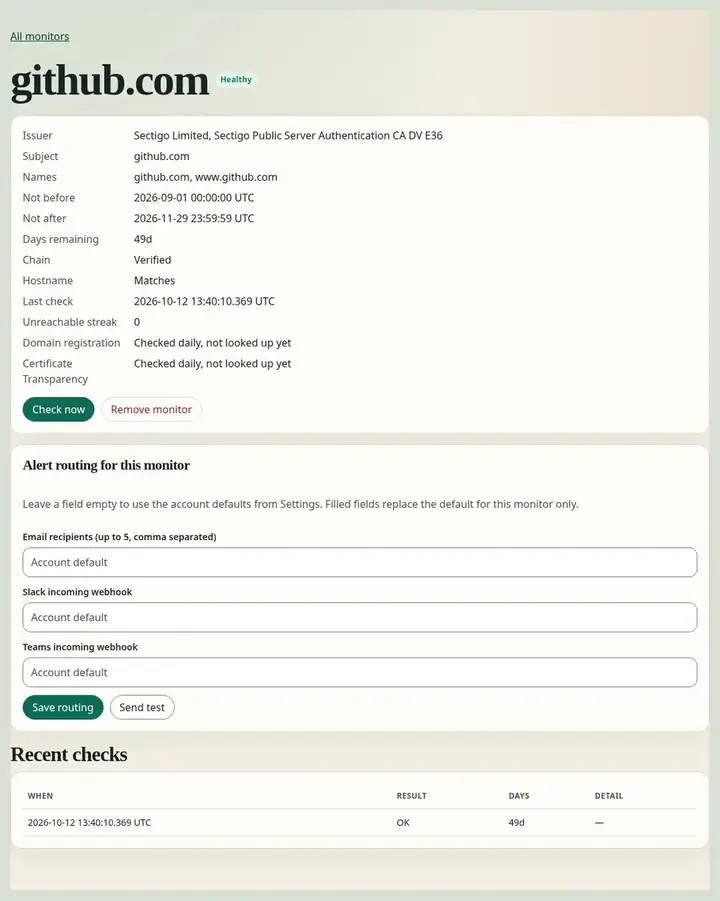
Each monitor page shows the certificate your server is serving right now, its chain and names, and below that the Certificate Transparency status with the date of the last look and a link to the latest entry. Domain registration expiry sits on the same page.
How it works under the hood
- Daily. Each hostname is looked up on crt.sh once a day, for certificates that have not yet expired.
- Exact names and wildcards. We match certificates that name your hostname, or a wildcard such as
*.example.comthat covers it. - A quiet start. The first lookup records what is already there, so adding a busy hostname doesn't flood your inbox.
- Patient with outages. crt.sh is a free public service and is sometimes overloaded. When a lookup fails we try again a few hours later instead of skipping the day.
- No setup. There is nothing to switch on. Add a hostname and CT watch starts with it.
Who gets the most from it
Security and platform teams get an early sign of misissuance without running their own log monitor. Agencies and MSPs see when a client moves a site to a new host without telling them. SaaS teams with customer domains spot certificates issued by a provider they forgot they connected. It pairs well with SSL monitoring for agencies, SSL monitoring for MSPs, SSL monitoring for SaaS, and SSL monitoring for online stores.
Set it up
- Create a free account and add your hostnames, one at a time or with bulk import.
- Pick where alerts go in Settings. Slack or a signed webhook into your security tooling works well for CT news.
- Send a test so you know every channel works.
CT watch runs alongside expiry reminders, breakage alerts and domain expiry monitoring, all included on every plan. See everything else on the features page.
Three longer notes sit next to the checkers. Certificate transparency search shows how to read a log entry and compare it with the handshake. SSL certificate discovery is how a name gets onto the list in the first place. SSL monitoring versus uptime monitoring separates a failed handshake from a failed homepage.
Operators who want the product around these checks can read what each check covers, SSL monitoring for SaaS and APIs, and ingress and load balancer certificate expiry. Look up the issuer and the names on one live host. Alerts leave the dashboard through signed webhooks or PagerDuty.
Related guides
- How to search a certificate transparency log
- Served certificate, CT log, and chain side by side
- Look up the certificate the server is serving now
- The registration date next to the certificate date
- A signed webhook when a new certificate is logged
Guides by team type
Pick the page that matches how you run certificates today:
Check a site with the free SSL checker or see pricing. Read the 47-day certificate timeline and Let's Encrypt expiry emails. The set is on free SSL tools. Every guide is indexed on SSL certificate guides. Comparisons are indexed on SSL monitoring comparisons.
FAQ
Is Certificate Transparency monitoring included on the Free plan?
Yes. Every monitored hostname on every plan, including Free, is checked against Certificate Transparency logs once a day.
Where does the data come from?
From crt.sh, a public search service over the Certificate Transparency logs that browsers require CAs to use.
Will I get an alert for every certificate ever issued?
No. The first check records what is already logged. After that you only hear about certificates that are new since the last check.
Does it cover every subdomain of my domain?
It covers each hostname you add, plus wildcard certificates that cover it. To watch another subdomain, add it as a monitor too, or paste the full list into bulk import.
How fast will I hear about a new certificate?
Within about a day. CT is checked daily. If crt.sh is busy, we try again a few hours later.
What should I do when I get a CT alert?
If you or your host just renewed, nothing. If you don't recognize the issuer or the timing, find out who requested it, then ask that CA to revoke it if it was not authorized.