UptimeRobot alternative for SSL certificate monitoring
If expiring and broken certificates are the job, SSL Clock does that one job. Free is $0 a month for 3 sites. Starter is $9 a month for 25.
An UptimeRobot SSL monitoring alternative should warn you before the certificate expires, not only when HTTPS fails. SSL Clock reads the live certificate on the free plan and sends reminders at 30, 14, 7, 3 and 1 day.
SSL Clock and UptimeRobot, feature by feature
| Feature | SSL Clock | UptimeRobot |
|---|---|---|
| Free plan | 3 certificates, no card, SSL checks included | 50 monitors at 5-minute checks. Its table says SSL monitoring is paid plans only |
| Cheapest plan with SSL alerts | Free, then Starter at $9 a month for 25 | Solo at $10 a month, or $9 billed yearly, for 10 monitors |
| Price per certificate | $0.36 Starter, $0.19 Pro, $0.14 Business | $1.00 Solo, $0.41 Team, $0.39 Scale, if each monitor watches one site |
| Expiry reminders | 30, 14, 7, 3 and 1 day by default, or any 1 to 10 days you pick | 30, 14 and 7 days |
| Certificate problems caught | Expired, hostname mismatch, invalid chain, TLS errors, unreachable, certificate changed | SSL errors on HTTPS monitors |
| Fix steps in each alert | Yes | Not listed |
| Slack and Microsoft Teams | Every plan, including Free | Solo and up |
| Webhooks and PagerDuty | Every plan, including Free | Team and up |
| Domain expiry | Daily RDAP lookups on every plan | Paid plans, 30, 14 and 7 days |
| Certificate Transparency watch | Daily, every plan | Not listed |
| Uptime and response times | No. Certificates and domains only | Yes, its main job, from 60-second checks on Solo |
| Login seats | 1 Free, 3 Starter, 10 Pro, 25 Business | 3 on Team, 5 on Scale |
| REST API | Every plan | Every plan |
UptimeRobot plans and limits from uptimerobot.com/pricing, checked 18 Oct 2026, before tax.
Why SSL-only buyers end up on an uptime plan
At UptimeRobot, SSL monitoring is a setting on an HTTPS monitor. That is handy if you already pay for uptime. If you came for certificate alerts, it means buying a plan built around 60-second uptime checks, status pages and on-call features to get a warning that only needs to fire a few times a year per site.
Certificates fail in slow, predictable ways. A renewal job stops, a DNS change breaks validation, a load balancer keeps serving last quarter's certificate. Checking every minute does not catch these sooner. Warning early does, and so does telling you what broke. That is all SSL Clock does, so it costs less: 25 certificates for $9 a month against 10 monitors for $10.
What an alert from SSL Clock looks like
Every alert names the host, the days left and the likely cause, then the fix. "Your certificate covers www.example.com but not example.com. Add the bare domain to your next renewal." No codes to look up.
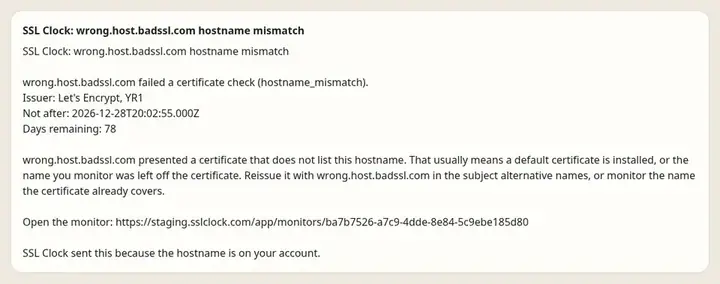
Alerts go to email (you plus up to 5 more people), Slack, Microsoft Teams, a signed webhook or PagerDuty, and each hostname can have its own destinations. All of that is on Free too.
Cost at different sizes
| Sites with certificates | SSL Clock | UptimeRobot |
|---|---|---|
| 3 | $0 a month (Free) | $10 a month (Solo, 10 monitors) |
| 10 | $9 a month (Starter, 25) | $10 a month (Solo, 10 monitors) |
| 100 | $29 a month (Pro, 150) | $41 a month (Team, 100 monitors) |
| 200 | $69 a month (Business, 500) | $77 a month (Scale, 200 monitors) |
Monthly list prices in US dollars. UptimeRobot's yearly prices are $9, $35 and $65 a month. Ours are $90, $290 and $690 a year. SSL Clock is the certificate watch. Add the hostnames here even if something else already pings the homepage.
What this product watches
The live certificate: expiry, hostname, chain, domain registration and Certificate Transparency. Reminders at 30, 14, 7, 3 and 1 day, with the cause and the fix in the alert.
Alerts that name the fix
When a check fails we tell you the likely cause and the steps to fix it. Reminders hit at 30, 14, 7, 3 and 1 day by default. Slack, Teams, signed webhooks and PagerDuty sit on Free.
Moving your HTTPS monitors
In UptimeRobot, open the monitor list and copy the URLs of the HTTPS monitors you care about, or export them. Paste the URLs into SSL Clock's bulk import. We strip the scheme and path and keep the hostname. Then choose reminder days and channels in Settings and press Send test.
Five reminder days, not three
UptimeRobot lists SSL reminders at 30, 14 and 7 days on paid plans. SSL Clock adds 3 and 1, and you can add up to 10 reminder days of your own. That extra pair matters when a renewal fails after the 7-day mail and nobody is in the office until Monday.
Moving off UptimeRobot? Send us the list
Export your HTTPS monitors as a CSV, or paste the URLs into an email. We pull out the hostnames, add them to your account and set up alerts to match what you had.
Switch to a paid plan and your first 3 months are free. Or keep Free for 3 certificates, no card needed.
Plan details are on the pricing page. For other tools, see the price per certificate comparison and the 2026 tools roundup.
Guides by team type
Pick the page that matches how you run certificates today:
Check a site with the free SSL checker or see pricing. Read the 47-day certificate timeline and Let's Encrypt expiry emails. The set is on free SSL tools. Every guide is indexed on SSL certificate guides. Comparisons are indexed on SSL monitoring comparisons.
FAQ
When were the UptimeRobot details checked?
On 18 Oct 2026, from UptimeRobot's public pricing page.
Does UptimeRobot's free plan include SSL monitoring?
Its pricing comparison table says SSL monitoring is included only in paid plans. The free plan covers 50 uptime monitors at 5-minute intervals.
What does SSL Clock watch?
Certificates, the chain, hostname coverage, domain registration expiry and Certificate Transparency logs. A host that stops answering for 3 checks in a row raises an unreachable alert. The job is the live certificate, not homepage uptime.
What do I get on Free?
3 certificates with email, Slack, Teams, webhook and PagerDuty alerts. No card. No time limit.
How often does SSL Clock check?
Every 6 hours on Free and Starter and every hour on Pro and Business. Certificates change on a scale of days and weeks, so this is plenty for expiry and breakage.
How do I move my HTTPS monitors across?
Export or copy the URLs from UptimeRobot, paste them into SSL Clock's bulk import and we pull the hostnames out. Or send the list to us through the switch page and we do it for you.