Let's Encrypt expiry emails ended. SSL Clock sends them.
Those emails stopped on 4 June 2025. We watch the certificate the server serves and remind you at 30, 14, 7, 3 and 1 day.
What happened
For years Let's Encrypt emailed you when a certificate was close to expiry and had not been renewed. Those emails ended on 4 June 2025 and the stored addresses were deleted. Sources: the Let's Encrypt announcement from January 2025 and the confirmation that the service has ended.
If Certbot breaks today, nobody tells you. The first sign is a browser warning on your site.
Who this affects
Anyone who relied on those emails as a safety net: small sites running Certbot on a single server, agencies with dozens of client boxes, and teams whose renewal jobs were set up years ago by someone who has since moved on.
Why renewals fail without anyone noticing
Let's Encrypt certificates last 90 days, and clients like Certbot try to renew when 30 days are left. When that attempt fails, it fails on a server nobody is watching:
- The systemd timer or cron job disappeared in a rebuild or OS upgrade.
- HTTP-01 requests are now redirected, cached or blocked by a CDN or firewall.
- DNS-01 stopped working because an API token expired or DNS moved to a new provider.
- The certificate renewed but the web server was never reloaded, so it still serves the old one.
- Repeated failures hit rate limits, so the next attempt is refused too.
Those emails were the backstop for all of this.
Set up a replacement
- List what you have. On each server run
certbot certificatesoracme.sh --list. - Create a free SSL Clock account. No card. Free covers 3 hostnames.
- Import the hostnames. Paste them one per line, or upload a CSV. Custom ports work as
host:port. - Pick channels. Email to you and up to 5 more addresses, plus Slack, Microsoft Teams, a signed webhook or PagerDuty.
- Send a test from Settings to prove every channel works.
Prefer to start with one site? Run it through the free SSL checker first.
Check your ACME client today
Certbot
sudo certbot certificates
sudo certbot renew --dry-run
systemctl list-timers | grep certbot
The dry run tries a renewal against Let's Encrypt's staging environment without touching your live certificates. The last line shows whether the renewal timer is scheduled. Some installs use a cron entry instead, so check /etc/cron.d/certbot too.
acme.sh
acme.sh --list
crontab -l | grep acme.sh
If the cron line is missing, renewal is not scheduled. Put it back with acme.sh --install-cronjob.
What a useful replacement alert does
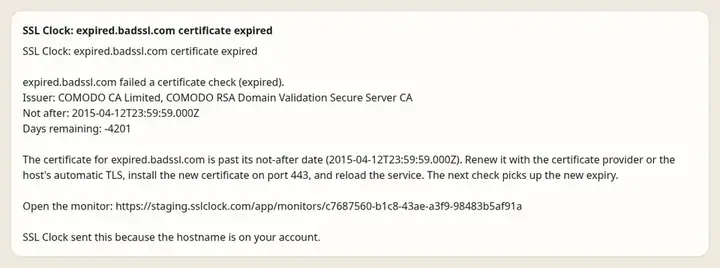
- Checks the live server. The old emails were based on what had been issued. A server can hold a fresh certificate on disk and still serve the old one. Only a check of the live connection catches that.
- Warns more than once. One email is easy to miss. A schedule like 30, 14, 7, 3 and 1 day keeps nudging until it is fixed.
- Reaches a person. The address you gave Let's Encrypt years ago may belong to someone who left. Send alerts to a team channel as well as an inbox.
- Explains the failure. A one-word "Expired" does not tell you what to fix. The alert should point at the likely cause, such as a missing intermediate or a name not on the certificate.
If you run many servers
Agencies and hosting teams often have Certbot on dozens of boxes, each set up by someone different. Collect the domains with certbot certificates on each one, or pull them from DNS, and import them all at once. Route each client or project to its own email list, Slack or Teams channel so alerts land with the people who can fix them. See SSL monitoring for agencies.
It works the same for certificates from ZeroSSL, Google Trust Services or any other CA, so you can keep one list for everything.
Your options compared
| Feature | SSL Clock | Old Let's Encrypt emails | Your own script |
|---|---|---|---|
| Still available | Yes | No, ended 4 June 2025 | Yes |
| Checks what the server serves | Yes | No, based on issuance records | If you write it that way |
| Reminders | 30, 14, 7, 3, 1 days, editable | A few emails before expiry | Whatever you build |
| Chain, hostname and outage alerts | Yes | No | Extra work |
| Slack, Teams, webhooks, PagerDuty | Yes, every plan | No | Extra work |
| Who maintains it | Us | Nobody now | You |
Signs renewal has already failed
certbot certificatesshows fewer than 30 days left on a certificate.- The renewal log in
/var/log/letsencrypt/has errors or has not been written to recently. - The certificate on disk is newer than the one the server sends. Compare with the SSL expiry checker.
Migration checklist
- Every domain from every server is in the list, including mail and API hostnames.
- Alerts go to a person or a channel someone reads, not a retired mailbox.
- Thresholds suit you. The default 30, 14, 7, 3 and 1 day works well for 90-day certificates.
- A test alert arrived on every channel.
- You know what changes next. Read the 47-day certificate timeline.
See everything SSL Clock checks on the features page. When the client log is quiet and the public date has not moved, read why Let's Encrypt auto-renewal fails quietly.
Three longer notes sit next to the checkers. Certificate transparency search shows how to read a log entry and compare it with the handshake. SSL certificate discovery is how a name gets onto the list in the first place. SSL monitoring versus uptime monitoring separates a failed handshake from a failed homepage.
Operators who want the product around these checks can read what each check covers, SSL monitoring for SaaS and APIs, and ingress and load balancer certificate expiry. Look up the issuer and the names on one live host. Alerts leave the dashboard through signed webhooks or PagerDuty.
Related guides
- Why a Let's Encrypt renewal can fail with no CA email
- The public lifetime schedule toward 47 days
- Wildcard and SAN names that can serve a different file
- A no-account check of the served expiry date
Guides by team type
Pick the page that matches how you run certificates today:
Check a site with the free SSL checker or see pricing. Read the 47-day certificate timeline and Let's Encrypt expiry emails. The set is on free SSL tools. Every guide is indexed on SSL certificate guides. Comparisons are indexed on SSL monitoring comparisons.
FAQ
When did Let's Encrypt stop sending expiry emails?
Let's Encrypt ended its expiration notification emails on 4 June 2025 and deleted the email addresses it had stored for them.
Why did they stop?
Let's Encrypt said most subscribers now renew automatically, that running the emails cost money and meant holding personal data, and that other services can do the job.
Does it work with Certbot, acme.sh, Caddy, Traefik?
Yes. We check the certificate your server actually serves, however it got there.
My certificates renew automatically. Do I still need alerts?
Yes. Automatic renewal can fail when DNS, firewalls, tokens or timers change. An outside check confirms that the renewed certificate is the one being served.
How early will SSL Clock warn me?
At 30, 14, 7, 3 and 1 day before expiry by default. Certbot renews when 30 days are left, so a 30-day alert followed by a 14-day alert means renewal failed.
Is there a free option?
Yes. SSL Clock's Free plan watches 3 hostnames with email, Slack, Teams, webhooks and PagerDuty alerts, no card and no time limit.
Can I import all my domains at once?
Yes. Paste them one per line or upload a CSV with hostnames in the first column.