SSL certificate lookup
Look up any SSL certificate and see who issued it
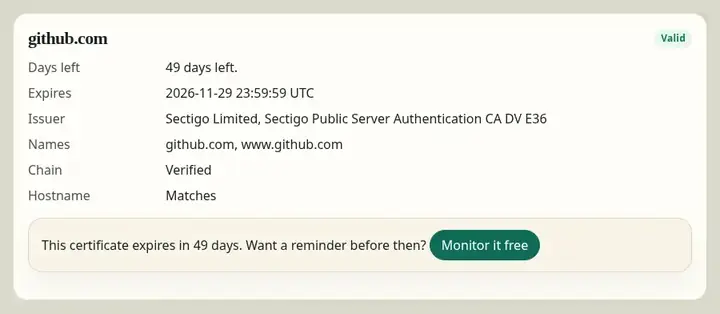
See who issued it, every name it covers, whether the chain is trusted and when it runs out. Free, and nothing is stored.
What each field tells you
| Field | Use it to answer |
|---|---|
| Issuer | Which CA signed this? Is it the one we pay for, or did someone else renew it? |
| Names | Which hostnames does it cover? Is the bare domain on it as well as www? Is a wildcard covering the subdomain I need? |
| Chain | Will every client trust it, or is an intermediate missing? |
| Hostname | Is this certificate actually for the name I entered? |
| Expires and days left | When does it need replacing, and has the last renewal reached this server? |
Common reasons to look up a certificate
- After a migration. Confirm the new host serves a certificate for your name, not the provider's default.
- Before a renewal. Note the issuer and every name on the current certificate so the new one covers the same list.
- A user reports a warning. See whether the problem is expiry, a missing intermediate or a name mismatch.
- Vendor or client due diligence. See who issues their certificates and how close they run to expiry.
- An unexpected issuer. A certificate from a CA you don't use can mean a CDN, a hosting change or someone else issuing for your name.
Look it up from the command line
OpenSSL shows the subject, issuer and names. Pass -servername so servers hosting several sites return the right certificate.
openssl s_client -connect example.com:443 -servername example.com </dev/null 2>/dev/null | openssl x509 -noout -subject -issuer -ext subjectAltNameTo search every certificate ever issued for a domain, not just the one being served, use a Certificate Transparency search. Read how SSL Clock uses Certificate Transparency monitoring.
Reading the issuer
The issuer is usually an intermediate certificate run by a certificate authority, so the name you see is often not the brand you bought from. Some common ones:
| Issuer name contains | Certificate authority | What it usually means |
|---|---|---|
| R10, R11, E5, E6 | Let's Encrypt | Free 90-day certificates from an ACME client, a host or a CDN. |
| WR1, WE1, GTS | Google Trust Services | Often a Google-hosted service or a CDN that uses Google's CA. |
| DigiCert, GeoTrust, Thawte, RapidSSL | DigiCert | Paid certificates, often bought by hand or through a reseller. |
| Sectigo, USERTrust | Sectigo | Paid certificates and many hosting control panels. |
| Amazon | Amazon Trust Services | Certificates from AWS Certificate Manager on a load balancer or CloudFront. |
If the issuer changes and nobody on your team renewed anything, find out why. It is usually a hosting or CDN change, and occasionally something worth a closer look.
Wildcards and multi-name certificates
A wildcard such as *.example.com covers one level of subdomain: shop.example.com yes, example.com and eu.shop.example.com no. A multi-name certificate lists each hostname it covers. If your name is missing from the Names field, the browser shows a warning even when the certificate is otherwise valid, and the lookup says Does not match.
Keep an eye on it
A lookup tells you about today. Watch the certificate and SSL Clock tells you when it is about to expire, when the chain or name breaks, and when the server starts serving a different certificate, with the old and new issuer and expiry side by side. Alerts go to email, Slack, Teams, webhooks or PagerDuty.
Free covers 3 certificates with no card. See also the full SSL checker with troubleshooting steps. A file you already saved can go through the certificate decoder, a request through the CSR decoder, and the live chain through the certificate chain checker.
What you can type
The free checker is hostname-only. Type a public hostname, a subdomain, or host and port such as api.example.com:8443. A full URL is reduced to that host and port. There is no field for a pasted certificate, a PEM file, or an email address. Nothing you type is stored on a lookup.
Private and internal certificates are not supported. The lookup opens a connection from the public internet. A name that answers only on a laptop, a VPN, or a private network will not resolve to a certificate here. Use a hostname your visitors or API clients already use.
One hostname is one lookup. If the site and the mail host use different certificates, run the lookup twice. A wildcard result still needs your exact name in the Names list. Write down the issuer, the names, and the expiry before you renew, so the replacement covers the same set.
From a single reading to a reminder
A clean lookup means the public certificate looks valid right now. It does not renew anything, and it does not watch the name after you close the tab. When the same hostname should be checked again, add it as a monitor. The monitor repeats the public read, stores days left, and sends the reminder schedule you set.
If the lookup already shows a mismatch or a broken chain, fix that on the server before you expect reminders to stay quiet. Reminders describe the certificate the next public read sees. They do not repair the file on disk.
Teams alerts, if you turn them on later, post through a channel webhook that only sends. The lookup itself never posts to Teams and never asks you to install a bot.
Guides by team type
Pick the page that matches how you run certificates today:
Check a site with the free SSL checker or see pricing. Read the 47-day certificate timeline and Let's Encrypt expiry emails. The set is on free SSL tools. Every guide is indexed on SSL certificate guides. Comparisons are indexed on SSL monitoring comparisons.
FAQ
What does the lookup show?
Status, days left, the expiry date in UTC, the issuing certificate authority, every hostname in the subject alternative names, whether the chain verifies to a trusted root and whether the name you entered is covered.
How do I find out who issued a certificate?
Look at the Issuer field. It names the certificate authority that signed it, such as Let's Encrypt, Google Trust Services, DigiCert or Sectigo, usually with the intermediate's name.
Why does the certificate list names I didn't expect?
One certificate can cover many hostnames. Shared hosting, CDNs and multi-domain certificates often list other sites on the same certificate. That is normal, as long as your name is on the list.
Can I see the certificate for a subdomain or another port?
Yes. Enter the full hostname, such as shop.example.com, or host:port, such as api.example.com:8443.
How is this different from searching Certificate Transparency logs?
CT logs list every certificate ever issued for a name. This lookup shows the one the server is actually serving right now, which is the one visitors see.
Can I be told when the certificate changes?
Yes. Watch this certificate free and SSL Clock tells you when the server starts serving a different certificate, with the old and new issuer and expiry.