KeyChest shut down. Your renewals still need watching.
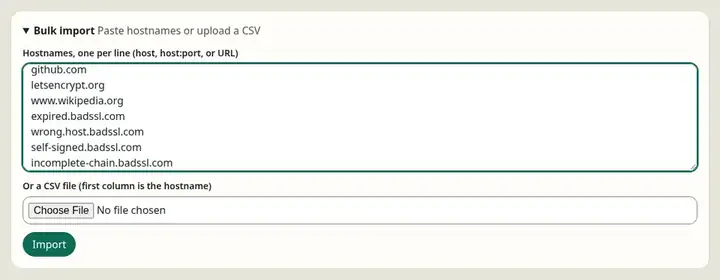
Paste the domain list. We check the public certificate and remind you at 30, 14, 7, 3 and 1 day.
If you relied on KeyChest for expiry warnings, those warnings have stopped. Add your domains to SSL Clock, choose email, Slack or Teams, and reminders start on the next check.
What happened to KeyChest
KeyChest ceased operations on 14 February 2026 (source: keychest.net). If it was what warned you before certificates expired, those warnings stopped with it. Renewals still need a backstop, and with maximum certificate lifetimes falling to 47 days by 2029 you need one more. See the 47-day timeline.
How KeyChest features map to SSL Clock
| What you relied on | In SSL Clock |
|---|---|
| Expiry reminders | 30, 14, 7, 3 and 1 day by default, editable to any 1 to 10 days |
| Server checks | Live TLS checks every 6 hours on Free and Starter, hourly on Pro and Business |
| Domain expiry | Daily RDAP lookups with warnings at 30, 14, 7 and 1 day |
| Certificate Transparency | Daily CT log watch for each hostname you add |
| Problem alerts | Expired, hostname mismatch, invalid chain, TLS errors, unreachable and certificate changes |
| Where alerts go | Email, Slack, Microsoft Teams, signed webhooks and PagerDuty |
| Adding servers | Bulk import from a pasted list or CSV, or the REST API |
| Automatic discovery | Not available. You choose which hostnames to watch |
Move your domains across
If you saved your KeyChest server list, paste it into bulk import as it is. SSL Clock reads one hostname per line or the first column of a CSV, skips duplicates and accepts host:port for mail and admin ports. Choose where alerts go and send a test.
Where SSL Clock differs
We focus on the certificates you choose to watch, checked from the public internet with no agents, keys or software on your servers. Every alert says what went wrong and how to fix it, and alerts can go to email, Slack, Teams, signed webhooks or PagerDuty, routed per hostname. REST API access is on every plan, including Free.
No export? Rebuild the list
- Export records from your DNS provider and keep the hostnames that serve websites, APIs or mail.
- On servers with Certbot, run
certbot certificatesto list every domain it manages. - Check your hosting panel, CDN and load balancer for custom hostnames.
- Search public Certificate Transparency logs for your domain to find certificates you forgot about.
Check any of them now with the free SSL checker.
What you get on day one
Once your hostnames are in, each one is checked on the next run and shows its status, days left, issuer and expiry date on the dashboard. Problems such as an expired certificate, a hostname mismatch or a broken chain are flagged straight away, with the likely cause and the fix. The next day, domain registration and Certificate Transparency lookups fill in. From then on, reminders arrive at 30, 14, 7, 3 and 1 day before each expiry.
Things KeyChest users ask us
Can I keep a record of every certificate?
Yes. Export the full list as CSV at any time, and opt in to a monthly summary email that lists every certificate and its expiry.
Can my colleagues see it?
Yes. Invite admins and viewers. Starter has 3 seats, Pro 10 and Business 25.
Can I get alerts somewhere other than email?
Yes. Slack, Microsoft Teams, signed webhooks and PagerDuty are on every plan, including Free.
What you get after import
Once the hostnames are in, the next check shows status, days left, issuer and expiry. Problems such as an expired certificate, a hostname mismatch or a broken chain are flagged with the cause and the fix. Domain registration and Certificate Transparency fill in the next day.
Pricing
Free is $0 a month for 3 hostnames. Starter is $9 a month for 25. Pro is $29 a month for 150 with hourly checks. Business is $69 a month for 500. Email, Slack, Teams, webhooks and PagerDuty on every plan. See pricing and the full feature list.
Bring your old KeyChest domains over
Send the domains KeyChest used to watch as a list, a CSV or a screenshot of your old dashboard. We add them, set your reminder days and confirm once each certificate has been checked.
Switch to a paid plan and your first 3 months are free. Or keep Free for 3 certificates, no card needed.
Guides by team type
Pick the page that matches how you run certificates today:
Check a site with the free SSL checker or see pricing. Read the 47-day certificate timeline and Let's Encrypt expiry emails. The set is on free SSL tools. Every guide is indexed on SSL certificate guides. Comparisons are indexed on SSL monitoring comparisons.
FAQ
When did KeyChest shut down?
KeyChest ceased operations on 14 Feb 2026.
How do I move my domains?
Paste your domain list into SSL Clock's bulk import, or upload a CSV with hostnames in the first column. Then choose email, Slack, Teams, a webhook or PagerDuty. Free for 3 hostnames, no card.
I don't have an export from KeyChest. What now?
Rebuild the list from your DNS zones, your hosting panel or your ACME client with certbot certificates. Public Certificate Transparency search tools also list certificates issued for your domains.
Does SSL Clock find my servers automatically?
No. You add the hostnames you want watched. Once a hostname is added, we also watch CT logs and tell you about new certificates issued for it.
Do you check domain expiry?
Yes. We look up each domain's registration expiry daily over RDAP and warn at 30, 14, 7 and 1 day.
Is there a free plan?
Yes. 3 hostnames with email, Slack, Teams, webhooks and PagerDuty alerts, no card and no time limit. Starter is $9 a month for 25.