TrackSSL alternative
SSL Clock is $9 a month for 25 certificates and $29 a month for 150, with Slack and Teams on every plan including Free.
A TrackSSL alternative should keep certificate reminders and every alert channel without paying $39 a month for Teams or $79 for webhooks. SSL Clock puts Slack, Teams, webhooks and PagerDuty on the free plan and runs about $0.19 per certificate on Pro.
Side by side
| Feature | SSL Clock | TrackSSL |
|---|---|---|
| Plans, monthly | Free $0, Starter $9, Pro $29, Business $69 | Free, $19, $39, $79, $149 |
| Annual billing | $90, $290, $690 a year (two months free) | $17, $35, $72, $136 a month billed annually |
| Certificates included | 3, 25, 150, 500 monitors | 2, 20, 80, 200, 500 certificates |
| Price per certificate | $0.36, $0.19, $0.14 ($0.30, $0.16, $0.12 annual) | $0.95 to $0.30 |
| Free plan | Yes, 3 monitors, no card | Yes, 2 certificates |
| Team seats | 1, 3, 10, 25 | 1, 1, 2, 3, 5 |
| Check frequency | Every 6 hours on Free and Starter, hourly on Pro and Business | About every 6 hours |
| Email alerts | Yes, multiple recipients | Yes, up to 5 extra addresses |
| Slack | Yes, every plan | Yes, every plan |
| Microsoft Teams | Yes, every plan | $39 plan and up |
| Webhooks | Signed webhooks, every plan | $79 plan and up |
| PagerDuty | Yes, every plan | Not listed |
| SMS | No | Mentioned on homepage, not on pricing page |
| Certificate change alerts | Yes | Yes |
| CT log monitoring | Yes, daily | Listed as planned on their pricing page |
| Domain expiry | Yes, daily via RDAP | Not listed |
| REST API | Yes, every plan | $39 plan and up |
| Bulk import | Yes, paste a list or CSV | Yes, paste a list or CSV |
| Fix steps in alerts | Yes, every alert | Not listed |
| Reminder schedule | 30, 14, 7, 3, 1 days, editable | Pick from 1, 3, 7, 14, 21, 30, 60 days |
| Internal or private certificates | No, public hostnames only | Yes, agent in beta, $79 plan and up |
TrackSSL figures from trackssl.com/pricing, checked 18 Oct 2026. "Not listed" means we did not find it on their public pages, not that it is missing.
What you get on SSL Clock
Price per certificate
SSL Clock is $0.36 per certificate on Starter, $0.19 on Pro and $0.14 on Business. TrackSSL runs from $0.95 to $0.30. At 150 certificates we cost $29 a month, while TrackSSL's 200-certificate plan is $79 a month.
Every channel on every plan
Email, Slack, Microsoft Teams, signed webhooks and PagerDuty are on Free. TrackSSL lists Teams from $39 a month and webhooks from $79 a month.
Hourly checks on Pro and Business
Free and Starter check every 6 hours. Pro and Business check every hour.
Domain expiry and CT logs
We look up domain registration expiry over RDAP and watch Certificate Transparency logs daily. TrackSSL's public pricing page did not list a live CT product on 18 Oct 2026.
Fix steps in every alert
Each alert names the likely cause and what to do about it.
Pricing at different fleet sizes
| Certificates | SSL Clock | TrackSSL |
|---|---|---|
| 20 | $9 a month (Starter, 25) | $19 a month (Starter, 20) |
| 80 | $29 a month (Pro, 150) | $39 a month (Growth, 80) |
| 200 | $69 a month (Business, 500) | $79 a month (Complete, 200) |
| 500 | $69 a month (Business, 500) | $149 a month (Scale, 500) |
Price per certificate: SSL Clock vs TrackSSL
SSL ClockTrackSSL
- SSL Clock Business · 500 certs$0.14
- SSL Clock Pro · 150 certs$0.19
- TrackSSL Scale · 500 certs$0.30
- SSL Clock Starter · 25 certs$0.36
- TrackSSL Complete · 200 certs$0.40
- TrackSSL Growth · 80 certs$0.49
- TrackSSL Starter · 20 certs$0.95
Monthly prices in US dollars. See the full pricing comparison with other tools.
Public hostnames, not private networks
SSL Clock watches the certificate the public internet sees. No agent. No private keys. TrackSSL lists an internal agent in beta on its $79 a month plan. If your list is public sites, APIs and mail hosts, SSL Clock covers that job at $9 a month for 25 or $29 a month for 150.
Bringing your TrackSSL list over
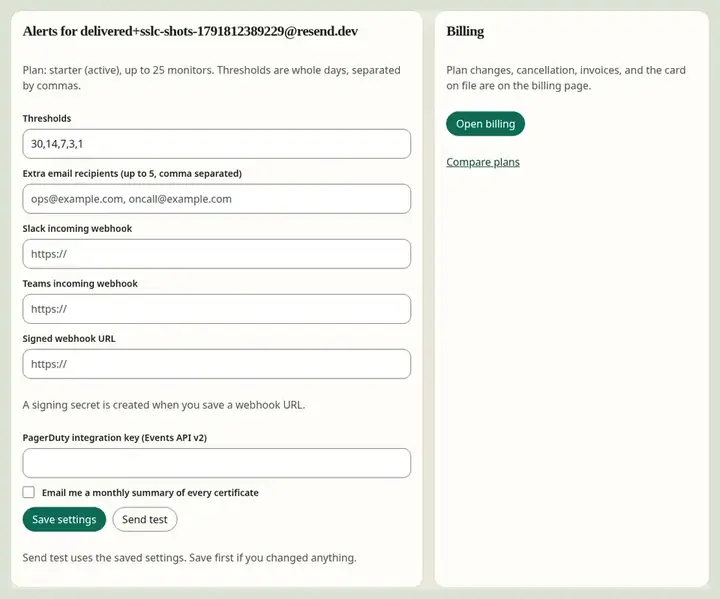
TrackSSL shows your certificates as a list of domains. Copy that list, paste it into SSL Clock's bulk import and pick the reminder days closest to the ones you chose in TrackSSL. If you used TrackSSL's extra email addresses, add the same people as recipients in Settings, then press Send test.
See all features or pricing.
Switching from TrackSSL: we do the setup
Send your TrackSSL certificate list in any format, even a screenshot. We add every hostname, match your reminder days where we can and let you know when it is ready.
Switch to a paid plan and your first 3 months are free. Or keep Free for 3 certificates, no card needed.
Guides by team type
Pick the page that matches how you run certificates today:
Check a site with the free SSL checker or see pricing. Read the 47-day certificate timeline and Let's Encrypt expiry emails. The set is on free SSL tools. Every guide is indexed on SSL certificate guides. Comparisons are indexed on SSL monitoring comparisons.
FAQ
When were these TrackSSL prices checked?
TrackSSL figures from trackssl.com/pricing, checked 18 Oct 2026.
What do I get on SSL Clock that I pay extra for on TrackSSL?
Teams, signed webhooks and PagerDuty sit on every SSL Clock plan, including Free. TrackSSL lists Teams from the $39 a month plan and webhooks from the $79 a month plan.
Does SSL Clock have an API and change alerts?
Yes. The REST API, signed webhooks, PagerDuty and certificate change alerts are on every SSL Clock plan, including Free. TrackSSL lists its API from the $39 a month plan and webhooks from the $79 a month plan.
How do I move my certificates across?
Copy your hostnames out of TrackSSL, paste them into SSL Clock's bulk import or upload a CSV, set your channels and send a test.
Does SSL Clock check more often?
Pro and Business check every hour. Free and Starter check every 6 hours, about the same as TrackSSL's stated cadence.
Do you watch internal certificates?
No. SSL Clock covers public hostnames only. TrackSSL lists an agent for internal certificates in beta on its $79 a month plan and up.