Starter, 3 seats
$9 a month
$0.36
Paste the client list. We check the public certificate and alert you at 30, 14, 7, 3 and 1 day.
"Our site says Not Secure. Can you look?" It arrives on a Friday afternoon, copied to their boss. The fix takes ten minutes, but the client remembers it. With SSL Clock you saw it coming three weeks earlier and renewed it on a Tuesday.
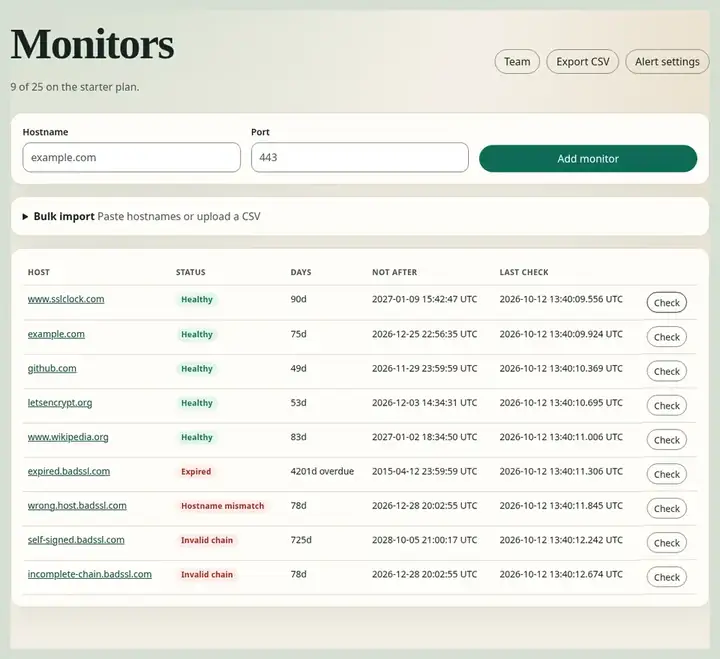
Dozens of sites on different hosts and different CAs, in one list, with what expires next at the top. Each row shows status, days left, the expiry date and when we last checked.
Set account-wide channels once, then override them per site. Client A's alerts go to their Slack channel and their project lead. Client B's go to a Teams channel and the account manager's inbox. Everything else lands in your own ops channel.
Export the domain list from your hosting panel or project tracker, paste it into bulk import or upload the CSV, and every host is checked on the next run. Custom ports work as host:port. When a client leaves, delete their hosts and the slots free up.
Every alert says what broke and what to do: "The certificate covers www.example.com but not example.com. Add the bare domain to the next renewal." Anyone on the team can fix it, including people who never touched the server.
WordPress on managed hosting, a static site on a CDN, a headless store on a cloud platform, a legacy PHP app on a VPS. It makes no difference to us, because we only look at what the public internet sees. There are no plugins to keep updated and nothing to install on client servers, so onboarding a client never needs their IT team's sign-off.
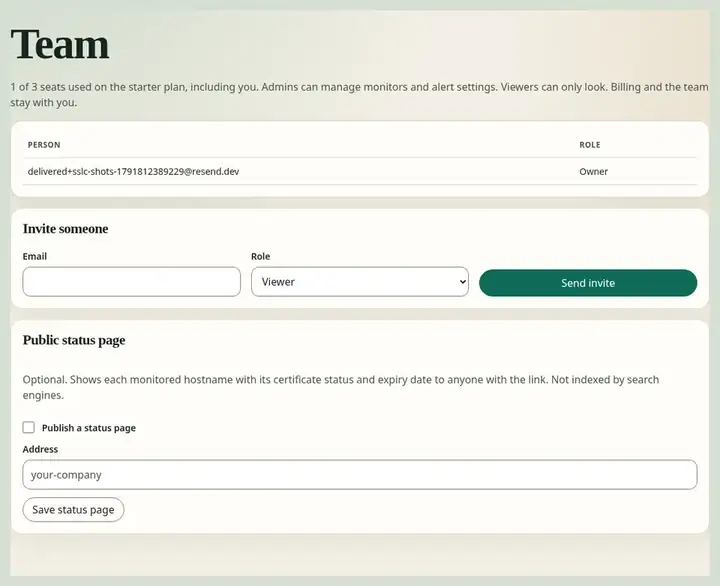
Invite a client as a viewer so they can see their certificates without changing anything, or publish a public status page with each hostname's status and expiry date. The page is not indexed by search engines. Opt in to a monthly summary email, and export the list as CSV for your own reports.
You are launching a client's new site on Thursday. On Monday SSL Clock flags shop.client.com with a hostname mismatch. The CDN is serving its default certificate because the custom hostname was never validated. You fix the DNS record on Monday afternoon, the next check shows Healthy, and the launch goes ahead as planned.
Without monitoring, the first person to notice is the client, on Thursday, in front of their team.
A campaign microsite you built two years ago still runs on an old VPS. Nobody has logged in since. SSL Clock's 30-day reminder lands in your #client-sites Slack channel. A junior developer finds the Certbot timer was removed in an OS upgrade, restores it, renews, and the next check shows the new expiry date. Total time: twenty minutes, on a normal working day.
Spreadsheets break the moment someone adds a microsite without telling you. SSL Clock becomes the roster: import every hostname once, sort by days left, and fix the red rows before Friday. Expiry reminders are only the start. We also flag hostname mismatches after a CDN cutover, broken chains after a rushed install and new certificates in public CT logs when a client moved DNS without a ticket.
Agencies often watch the marketing site and forget the client's portal, webhooks subdomain or legacy app. host. Add each public name, including host:port for mail and admin panels, so the check matches what their customers hit.
Read how this differs from expiry-only spreadsheets on the features page, or run the free SSL checker on a problem site first. Building the hostname sheet before the import is an agency certificate audit.
A lapsed domain registration takes down the site, the email and every certificate at once, and it often happens because the card on the registrar account expired. We look up each domain's registration expiry daily over RDAP and warn at 30, 14, 7 and 1 day, so you can chase the client while there is still time. See domain expiry monitoring.
$0.36
$0.19
$0.14
Annual billing gives two months free. See all plans or how that compares in the pricing comparison. Running infrastructure for clients too? Read SSL monitoring for MSPs.
Pick the page that matches how you run certificates today:
Check a site with the free SSL checker or see pricing. Read the 47-day certificate timeline and Let's Encrypt expiry emails. The set is on free SSL tools. Every guide is indexed on SSL certificate guides. Comparisons are indexed on SSL monitoring comparisons.
Yes, if you want. Invite them as view-only team members, or publish an optional public status page. Alerts can also go to any email you choose.
Yes. We check every site from the outside, so it works the same on any host, CDN or server. You can also send each site's alerts to that client's own email, Slack or Teams.
Paste the hostnames into bulk import, one per line, or upload a CSV. Duplicates are skipped and anything over your plan limit is reported.
Yes. Invite admins who can manage monitors and alerts, and viewers who can only look. Starter has 3 seats, Pro 10 and Business 25.
Every account can opt in to a monthly summary email listing each certificate and its expiry, and you can export the full list as CSV at any time.
Alerts and status pages carry SSL Clock branding.
Remove their monitors and the slots free up straight away. Plans are monthly or yearly with no contract.
Yes. We look up each domain's registration expiry daily and warn at 30, 14, 7 and 1 day, which catches the lapsed-card problem before the site goes dark.