SSL certificate checker
Check any SSL certificate in seconds and see exactly what's wrong
Free SSL checker with no signup: enter a domain and we read the live certificate your visitors get. Chain, hostname match, issuer and expiry show up in seconds, with plain-English fixes when something fails.
Check SSL
Check SSL on any public host before you change DNS, after a deploy, or when a browser warning shows up. This free SSL checker reads the chain, the hostname, the issuer, and the expiry. The form stays on screen so you can re-run the check while you fix the server.
Start free monitoring for 3 sites. Compare the Oh Dear alternative for SSL only monitoring and the TrackSSL alternative with Slack on Free.
Three longer notes sit next to the checkers. Certificate transparency search shows how to read a log entry and compare it with the handshake. SSL certificate discovery is how a name gets onto the list in the first place. SSL monitoring versus uptime monitoring separates a failed handshake from a failed homepage.
Operators who want the product around these checks can read what each check covers, SSL monitoring for SaaS and APIs, and ingress and load balancer certificate expiry. Look up the issuer and the names on one live host. Alerts leave the dashboard through signed webhooks or PagerDuty.
What the free SSL checker runs on every check
Each click repeats the same steps a browser takes on a first visit, without caching an old chain from yesterday.
- Resolve and connect. We look up the hostname, open TCP to port 443 (or the port you entered) and start TLS with Server Name Indication set to the name you typed.
- Read the served certificate. We parse the leaf certificate the server presents: issuer, subject names, validity window and signature.
- Verify the chain. We build a path to a trusted public root using the intermediates the server sends. A missing intermediate shows as Not verified even when Chrome looks fine.
- Match the hostname. We confirm the name you entered appears on the certificate, including wildcard rules.
- Count days left. We compare not-after in UTC to now and label status as Valid, Expires soon or Expired.
Nothing here needs your private key. We only read the public certificate already sent to every visitor.
What the SSL checker shows
The SSL checker opens a fresh TLS connection and reads the certificate your visitors get right now: expiry, issuer, every hostname on the cert, chain trust and hostname match.
Enter a domain above. We do not store it. Within a fair-use cap you can check as many sites as you need before you add monitors.
What the result means
Every field comes from that live connection to the host you entered.
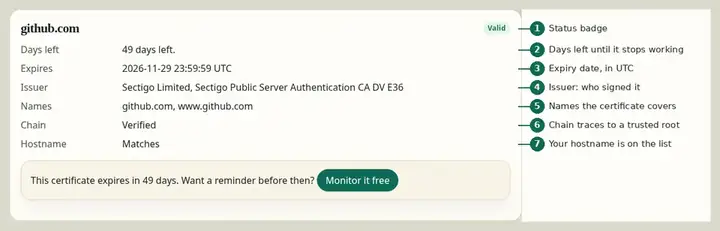
| Field | What it tells you |
|---|---|
| 1. Status | Valid means more than 30 days left with a trusted chain and matching name. Expires soon means 30 days or less. Expired means past the expiry date. Anything else names the problem, such as Hostname mismatch or Invalid chain. |
| 2. Days left | Whole days until the certificate stops working, counted from the moment you checked. |
| 3. Expires | The certificate's not-after date in UTC. After this, browsers block the site. |
| 4. Issuer | The certificate authority that signed it. A surprise issuer can mean someone else renewed or replaced the certificate. |
| 5. Names | Every hostname the certificate covers, from its subject alternative names. Yours must be on this list, either exactly or through a wildcard. |
| 6. Chain | Verified when the certificate traces back to a trusted root. Not verified when an intermediate is missing, the certificate is self-signed or it comes from a private CA. |
| 7. Hostname | Matches when the name you entered is covered. Does not match when the server sent a certificate for a different site. |
Fixing the common errors
Missing intermediate certificate
The server sends its own certificate but not the intermediate that links it to a trusted root. Desktop browsers often cope, while phones, API clients and older systems fail. Install the full chain file your CA provides, often called fullchain.pem, instead of the single certificate.
Name mismatch
The certificate is valid but covers different names. Common after a migration, when example.com is covered but www.example.com is not, or when a CDN serves its default certificate. Reissue the certificate with every hostname you use, or point the hostname at the server that has the right one.
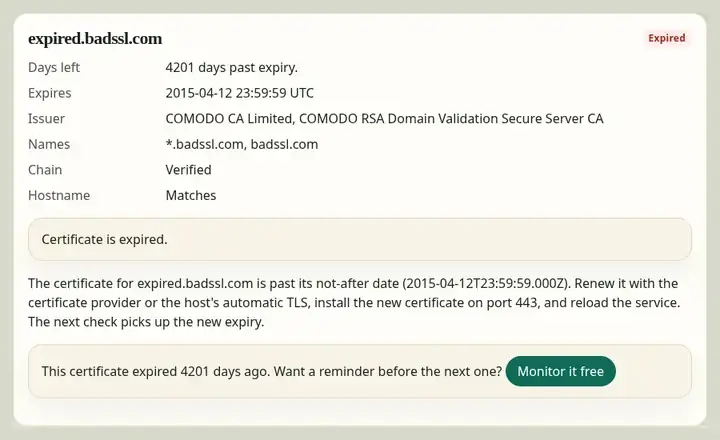
Expired
The renewal did not happen or the new certificate was never loaded. Check the renewal job's logs, renew, then reload the web server, load balancer or CDN so it serves the new file. If renewal ran but the date did not move, the old certificate is still loaded somewhere.
Self-signed
The certificate was signed by itself rather than a public CA, so no browser trusts it. That is fine on a lab box but never on a public site. Replace it with a free certificate from an ACME CA such as Let's Encrypt.
Check it yourself
In the browser
Click the padlock or the site settings icon next to the address and open the certificate details. Chrome and Edge show Valid to or Expires on, Firefox shows Not After, and Safari shows Expires. This only shows the certificate your browser received, and browsers can hide chain problems by filling in a missing intermediate from their cache.
With OpenSSL
Always pass -servername, or servers that host several sites may return the wrong certificate.
openssl s_client -connect example.com:443 -servername example.com </dev/null 2>/dev/null | openssl x509 -noout -dates -issuer -subject -ext subjectAltNameTo see the whole chain the server sends, add -showcerts. A single certificate block usually means the intermediate is missing.
openssl s_client -connect example.com:443 -servername example.com -showcerts </dev/nullWith PowerShell
Works on Windows without extra tools. This reads the certificate whatever its status, so check the dates and issuer yourself.
$tcp = New-Object Net.Sockets.TcpClient("example.com", 443)
$ssl = New-Object Net.Security.SslStream($tcp.GetStream(), $false, { $true })
$ssl.AuthenticateAsClient("example.com")
$cert = New-Object Security.Cryptography.X509Certificates.X509Certificate2($ssl.RemoteCertificate)
$cert.NotAfter; $cert.Issuer
$tcp.Close()
Questions people ask before they monitor
Is this SSL checker free? Yes. No account, no card and no limit except fair use (about 30 checks an hour per visitor).
Do you save the domains I check? No. The hostname is used for one connection and discarded.
Why does my browser look fine but you report an error? Browsers cache intermediates and old TLS sessions. We always start clean, which is what API clients and phones see.
What should I do after a clean result? Add the hostname to SSL Clock if you want reminders at 30, 14, 7, 3 and 1 day, plus alerts if the chain or name breaks later.
Can I check mail or admin ports? Enter host:port. STARTTLS on port 587 is not supported in the form; use OpenSSL in the section below for that case.
One check is a snapshot
A clean result today does not cover next month, because certificates change and renewals fail. Turn this check into a watch and we alert you on the next check after something changes, with the same plain-English cause and fix you see here. Monitoring also catches a changed issuer, domain registration expiry and new certificates in public Certificate Transparency logs.
Certificate lifetimes are also getting shorter. Read the 47-day certificate timeline, or look up only the days left with the SSL expiry checker.
Free SSL checker vs Qualys SSL Server Test
Qualys SSL Server Test is a deep, lab-grade look at one public site. SSL Clock is the everyday expiry and chain check, plus reminders after you leave the page. Use the lab test when you want that depth. Use this checker when you want the certificate your visitors get, and a reminder if it later expires or the chain breaks.
Open Qualys SSL Server Test. We do not replace that test. A result here is only the certificate this checker read just now. Reminders at 30, 14, 7, 3, and 1 day are what continues after the tab closes.
Guides by team type
Pick the page that matches how you run certificates today:
Check a site with the free SSL checker or see pricing. Read the 47-day certificate timeline and Let's Encrypt expiry emails. The set is on free SSL tools. Every guide is indexed on SSL certificate guides. Comparisons are indexed on SSL monitoring comparisons.
FAQ
Is it free?
Yes. No signup and no card. Check as many sites as you like, within a fair-use limit of 30 checks an hour.
Do you store the domain?
No. Domains you enter in the free checker are checked and then discarded. We don't save them.
Why does my browser show a warning but the cert isn't expired?
Usually a hostname mismatch or a missing intermediate certificate. The result names which one and how to fix it.
Can I check a port other than 443?
Yes. Enter host:port, for example mail.example.com:993 or api.example.com:8443. Port 443 is used when you leave it out.
Can I check a server that is only on my internal network?
No. The checker connects from the public internet and refuses private and internal addresses, so it sees what your visitors see.
What does Chain: Not verified mean?
The certificate could not be traced to a trusted root. The usual causes are a missing intermediate certificate, a self-signed certificate or a private CA.
Why is my result different from my browser?
Browsers cache intermediates and may reuse an older connection. Our check makes a fresh connection with the hostname you entered, so it reflects what a new visitor gets right now.
How do I get warned before it expires?
Create a free account and add the hostname. We check it every 6 hours on Free and Starter, and every hour on Pro and Business, and remind you at 30, 14, 7, 3 and 1 day before expiry.
Does the checker need my private key?
Never. It reads the public certificate the server sends to everyone who connects.