Track every client's certificates in one account
Get the 30-day reminder into your change window. No agent. No private keys.
From emergency callout to scheduled work
A certificate that expires on a client's remote access portal at 7 a.m. is an emergency. The same certificate flagged 30 days earlier is a line item in next week's change window. SSL Clock gives you that 30-day warning.
Built around how MSPs work
Many clients, one account
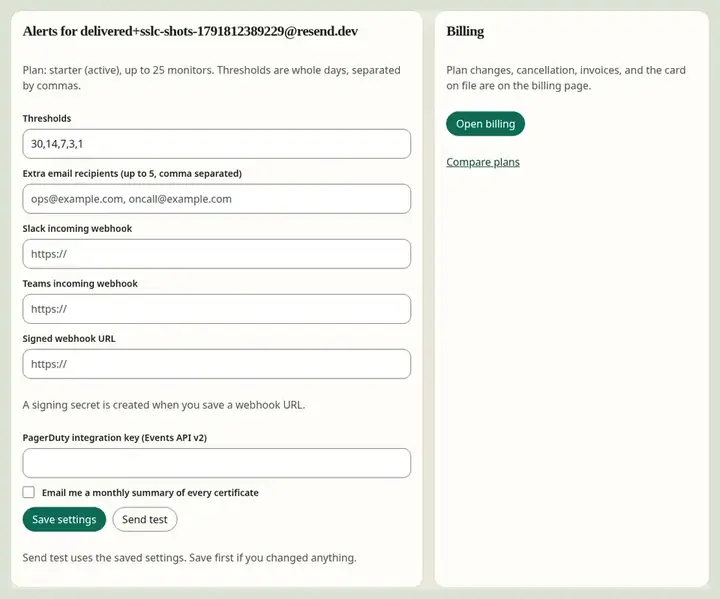
Add every client's hostnames to one account and route each one where it belongs. Per-site channels mean Client A's alerts reach their Teams channel and your NOC, while Client B's go to your PSA's ticket inbox.
Into your ticketing
Most PSA tools create tickets from email, so add the ticket inbox as an alert recipient. For more control, a signed webhook sends JSON with the event type, hostname, monitor link and severity to your automation platform. PagerDuty works through the Events API v2.
Microsoft Teams alerts
Alerts post to Microsoft Teams channels through a Workflows webhook or an older incoming webhook connector. Your techs see them where they already work.
Bulk import from your RMM export
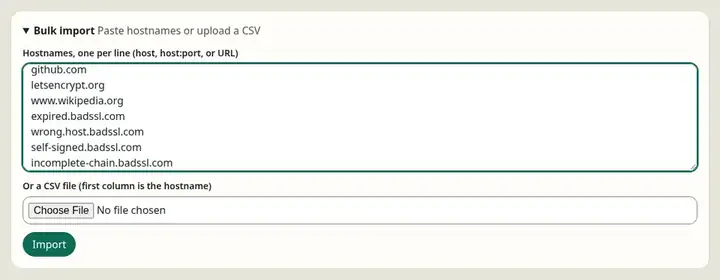
Export public hostnames from your RMM, documentation platform or DNS zones, then paste them or upload the CSV. The first column is used as the hostname, headers like "hostname" or "domain" are skipped, and duplicates are ignored.
What we cover and what we do not
We cover every certificate on a public hostname: websites, client portals, remote access gateways, APIs and mail servers that start with TLS on ports such as 465 and 993. We do not watch private-only certificates. Checks refuse private addresses on purpose, so the result matches what visitors see.
Fewer false alarms
A single network blip should not wake anyone. We only raise an unreachable alert after 3 failed checks in a row, and each reminder day is sent once per certificate. When a certificate is renewed, the reminders reset for the new expiry date automatically.
Custom ports and odd services
Client networks often run services on non-standard ports: an admin panel on 8443, a mail server on 993, a remote desktop gateway on 4443. Add each one as host:port and it is checked exactly like a website, with the same reminders, problem alerts and fix steps.
Reporting for client reviews
Opt in to a monthly summary email that lists every certificate, its days left and any problems. Export the full list as CSV for quarterly business reviews. Publish a status page if a client wants a live view.
Roles for your techs
Owners handle billing and the team. Admins add and remove monitors and change alert settings. Viewers can see everything and change nothing, which suits a client contact or a junior tech on their first week. Invites are sent by email and the seat count depends on your plan.
Onboarding a new client in a morning
- Pull the client's public hostnames from DNS and your documentation.
- Bulk import them, including
host:portentries for mail and remote access. - Route the client's monitors to their Teams channel and your PSA inbox.
- Fix whatever the first checks flag: expired, mismatched or broken-chain certificates show up straight away.
- Add the renewal dates to the client's maintenance plan.
A worked example: the forgotten gateway
A client's remote access gateway uses a paid certificate installed by hand two years ago. SSL Clock warns at 30 days in your Teams channel. The tech schedules the renewal for the next maintenance window, installs the new certificate, and the next check confirms the new expiry date and issuer. Had the new certificate gone in without its intermediate, the check would have flagged an invalid chain before staff started connecting on Monday.
Wildcards, gateways and the names clients actually use
A wildcard certificate on *.client.com still needs every hostname you serve to match the names on the cert. We read what the server sends for vpn.client.com, mail.client.com:993 and portal.client.com:8443, so a partial install or wrong SNI shows up before users do. We do not watch private-only certificates on internal networks, because our checks run from the public internet like a visitor's browser.
When a client rotates to a new CA, certificate change alerts show the old and new issuer side by side. Pair that with daily Certificate Transparency watch to catch a cert issued on a host you forgot was in DNS.
MSP setup in one sitting
- Pull public hostnames from your RMM export or documentation wiki.
- Bulk import, using
host:portfor mail, RDP gateways and admin panels. - Route each client's monitors to their Teams channel and your PSA inbox.
- Fix anything red on the first dashboard load: expired, mismatch or broken chain.
- Document renewal owners in your change calendar using the expiry dates SSL Clock shows.
Pricing for a client base
Starter covers 25 hostnames for $9 a month. Pro covers 150 for $29 a month with hourly checks. Business covers 500 for $69 a month with hourly checks and 25 seats. Every plan has email, Slack, Teams, webhooks, PagerDuty and the REST API. See pricing, or read how we handle agency client rosters and Teams alerts.
Guides by team type
Pick the page that matches how you run certificates today:
Check a site with the free SSL checker or see pricing. Read the 47-day certificate timeline and Let's Encrypt expiry emails. The set is on free SSL tools. Every guide is indexed on SSL certificate guides. Comparisons are indexed on SSL monitoring comparisons.
FAQ
Do I install software on client networks?
No. There is nothing to deploy, approve or patch on client networks. We check from the outside, so you can start covering a new client the same day.
Where do the alerts go?
Email, Slack, Microsoft Teams, signed webhooks or PagerDuty, and each site can go to its own destination. Each alert names the cause and the fix, so tier-one can close it.
Can alerts open tickets in our PSA?
Yes, through email or webhooks. Send alerts to your PSA's ticket inbox, or point a signed webhook at your automation platform to create tickets from the JSON.
Can you monitor internal certificates?
SSL Clock checks certificates on public hostnames, including custom ports. We do not watch private-only certificates.
Do you check mail servers?
Yes, on ports where the server starts TLS straight away, such as 465 and 993. Enter host:port.
How many technicians can log in?
Starter has 3 seats, Pro 10 and Business 25. Admins manage monitors and alerts, viewers can only look.
Is there an API?
Yes. A REST API lets you add, remove, list and check monitors from your own tooling, on every plan.
Do you offer an SLA?
Paid plans have no service level agreement unless we agree one in writing. Alerts are a safety net alongside your own renewal process.