Keep a browser warning off your checkout
Shoppers leave when the padlock fails. We watch the certificate checkout actually serves.
What your customers see
An expired or mismatched certificate makes browsers show a full-page "Your connection is not private" warning. On a product page that costs a sale. On checkout it costs the sale, and the customer may not come back. What that warning does to a fetch, and what you can say about rankings, is in SEO and checkout when a certificate expires.
Where stores get caught out
- The checkout or payment subdomain on a different host from the shop.
- DNS changes during a platform move that break the CDN's automatic renewal.
- The bare domain left uncovered when shoppers type it without
www, or the other way round. - Campaign landing pages on a separate domain that nobody remembers until the ads are live.
- The domain registration itself lapsing because the card on file expired.
Warned weeks ahead, in plain English
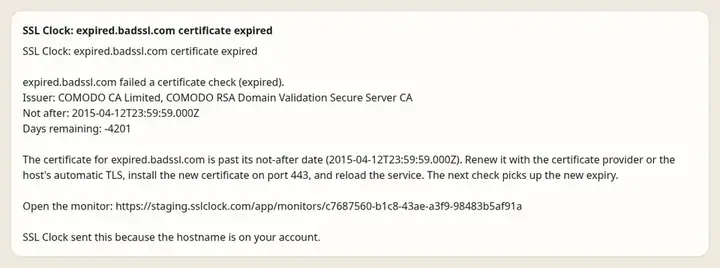
Reminders at 30, 14, 7, 3 and 1 day give you time to renew even if your developer is on holiday. If something breaks today, you hear about it on the next check. Each alert explains the problem and what to ask your host or developer to do.
Hosted platforms and CDNs
If your shop runs on a hosted platform or sits behind a CDN, certificates are usually issued and renewed for you. That is a good thing, and it still depends on details you control. Your domain's DNS must keep pointing at the platform, the custom domain must stay verified, and any separate checkout, blog or landing page domain needs its own certificate. When one of those slips, the platform cannot renew, and the first sign is a warning page. SSL Clock checks what shoppers actually receive, wherever the store is hosted.
Who gets the alert
Send alerts to yourself and up to 5 more people, such as your developer and your agency, or to a Slack or Teams channel. Each hostname can have its own recipients, so the checkout alert reaches whoever runs payments. If you work with an agency, ask them to add you as a viewer on their account so you can see your own certificates. See how agencies use SSL Clock.
What a warning page costs
Take a store doing $20,000 a month. That is roughly $28 an hour, around the clock, and far more during a sale. A certificate that expires at midnight on a Friday and is fixed on Monday morning can cost a weekend of sales. SSL Clock's Starter plan is $9 a month for 25 hostnames, and Free covers 3.
Getting started
- Create a free account. No card needed.
- Add your shop domain,
wwwand your checkout or payment domain. - Add your developer or agency as an extra email recipient.
- Press Send test and check the alert arrives.
From then on we check every 6 hours, or every hour on Pro and Business, and tell you before anything expires.
Your domain name matters too
A domain registration that lapses takes down the shop, the checkout and your email in one go. It usually happens because the card on the registrar account expired and the renewal notice went to an old inbox. SSL Clock looks up your domain's registration expiry every day and warns you at 30, 14, 7 and 1 day, alongside your certificate reminders.
Worked example: checkout on a separate hostname
Your storefront is on www.shop.example behind a CDN, but payments run on pay.shop.example with a certificate your PSP renews separately. Marketing renews the main site on schedule while pay. quietly hits 14 days left during a sale. SSL Clock routes the checkout monitor to your payments Slack channel, so finance sees the reminder even if the web agency only watches the marketing host.
If the PSP installs a new cert without the intermediate, the next check shows Invalid chain while the main site still looks green in an uptime tool. That is why we read the certificate, not just HTTP 200.
Peak season checklist
- Add the shop,
www, checkout and every landing page domain to SSL Clock. - Check none expire within 45 days of your busiest week. If one does, renew it early.
- Freeze DNS changes in the run-up to the sale.
- Make sure alerts reach someone who works during the sale, not a shared inbox.
- Run the free SSL checker on the checkout page the day before.
See plans and prices, or everything we check.
Guides by team type
Pick the page that matches how you run certificates today:
Check a site with the free SSL checker or see pricing. Read the 47-day certificate timeline and Let's Encrypt expiry emails. The set is on free SSL tools. Every guide is indexed on SSL certificate guides. Comparisons are indexed on SSL monitoring comparisons.
FAQ
What do shoppers see if the certificate expires?
Browsers show a full-page warning, and shoppers rarely click past it.
How much warning do I get?
Reminders at 30, 14, 7, 3 and 1 day. That is enough time to renew a certificate by hand.
My store is on a hosted platform. Do I still need this?
Hosted platforms usually manage certificates for you, and they still depend on your domain's DNS pointing at them. If a DNS change breaks validation, renewal fails. We check what shoppers actually get.
Do you check my domain registration too?
Yes. We look up your domain's expiry daily and warn at 30, 14, 7 and 1 day before it lapses.
I'm not technical. Will I understand the alerts?
Yes. Each alert says what is wrong in plain English and what to ask your host or developer to do.
Is it free for a small shop?
Yes. The Free plan watches 3 hostnames, which covers most small stores: the shop, www and one more.