Catch failed certificate renewals before your API goes down
cert-manager and Certbot fail when DNS, tokens or timers break. We watch the certificate each host serves.
Check what each endpoint serves
Renewal tooling depends on things around it. An IAM policy update breaks DNS-01. A new ingress rule swallows HTTP-01. A token expires. Nobody gets paged, because the renewal job is the thing that broke. SSL Clock checks the certificate each endpoint actually serves, whichever part failed. For ingress objects and the load balancer in front of them, read certificate expiry checks for Kubernetes ingress.
Every hostname, every environment
api., app., status., webhooks., staging and the old marketing domain. Forgotten subdomains are the ones most likely to expire unnoticed. Add them all with bulk import, or from your deploy pipeline with the REST API. Custom ports work too.
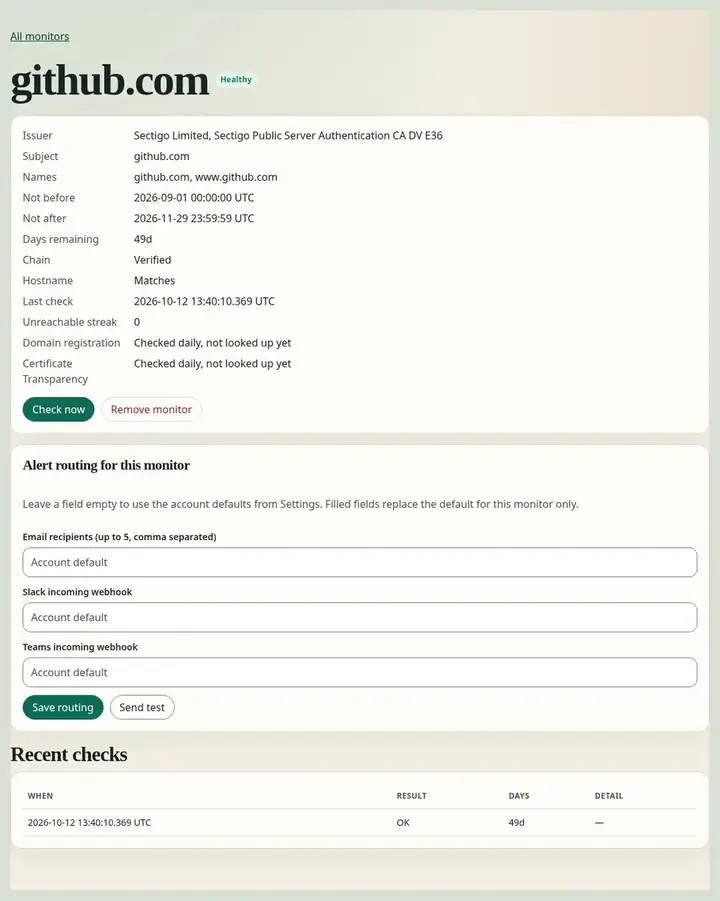
Failures as well as expiry dates
- Expiry reminders at 30, 14, 7, 3 and 1 day by default.
- Instant alerts for expired certificates, hostname mismatch, invalid chains and TLS errors, plus hosts that stop answering for 3 checks in a row.
- Certificate change alerts when an endpoint starts serving a different certificate, with the old and new issuer and expiry.
- Certificate Transparency watch for new certificates logged for your hostnames.
- Domain expiry from RDAP, so a lapsed registration doesn't take the whole product down.
Into the tools on-call already uses
PagerDuty through the Events API v2, signed webhooks with an HMAC-SHA256 signature for your own tooling, plus Slack and Microsoft Teams channels. Per-monitor routing sends the payments API's alerts to the payments team and the marketing site's to the web team.
Add monitors from your pipeline
Create an API key in Settings, then register new hostnames as part of a deploy. The response tells you if the hostname is already on the account or over your plan limit.
curl -X POST https://www.sslclock.com/api/v1/monitors \
  -H "Authorization: Bearer $SSLCLOCK_API_KEY" \
  -H "Content-Type: application/json" \
  -d '{"hostname": "api.example.com"}'
You can also list monitors, read check history, run a check on demand and remove a monitor when an environment is torn down. See the API docs.
What your tooling receives
Signed webhooks POST JSON like this, with an X-SSLClock-Signature header carrying a timestamp and an HMAC-SHA256 of the timestamp and body. Events cover expiry reminders, certificate errors, certificate changes, domain expiry, new CT log entries and tests.
{
  "event": "certificate.expiring",
  "id": "...",
  "sent_at": "2026-10-12T09:00:00.000Z",
  "monitor": { "id": "...", "hostname": "api.example.com", "port": 443, "url": "https://www.sslclock.com/app/monitors/..." },
  "subject": "SSL Clock: api.example.com expires in 14 days",
  "text": "...",
  "data": { "code": "days_14", "threshold": 14, "days_remaining": 14, "valid_to": "...", "issuer": "..." }
}
An incident that never happened
A platform team moves DNS to a new provider on a Friday. The DNS-01 credentials for cert-manager still point at the old one, and renewal for api.example.com starts failing. Three weeks later SSL Clock's 30-day reminder lands in Slack. At 14 days it is still there, so the on-call engineer updates the credentials in ten minutes. Without it, the API would have gone down for every customer at once.
Status pages for customers and teams
Publish an optional status page that shows each hostname's certificate status and expiry. Share it with enterprise customers who ask how you manage certificates, or with internal teams who depend on your endpoints. It is not indexed by search engines, and you can turn it off at any time.
Team access without shared passwords
Invite engineers as admins and give support or product staff view-only seats, so everyone can see certificate status without touching settings. API keys belong to the account, are shown once when created and are stored only as a hash.
Shorter lifetimes, more renewals
Certificates issued since March 2026 last 200 days at most. In 2027 that drops to 100 days. By 2029 the cap is 47 days. More renewals means more chances for one to fail. Read the 47-day timeline or see pricing, from free for 3 hostnames.
Roll out monitoring with your stack
- List every public endpoint:
api.,app.,status., webhooks and any customer-specific vanity domains. - Add them with bulk import or the REST API from your deploy pipeline.
- Send production alerts to PagerDuty or a signed webhook, staging to Slack, and marketing to email.
- Turn on CT watch so a surprise issuance on a hostname you retired still pages someone.
- Run an on-demand check after each certificate change to confirm the served file matches what cert-manager thinks it installed.
See every check type on features or compare uptime-only tools on served cert vs CT vs chain.
Guides by team type
Pick the page that matches how you run certificates today:
Check a site with the free SSL checker or see pricing. Read the 47-day certificate timeline and Let's Encrypt expiry emails. The set is on free SSL tools. Every guide is indexed on SSL certificate guides. Comparisons are indexed on SSL monitoring comparisons.
FAQ
Does this replace cert-manager, Certbot or my cloud provider?
No. Those tools renew certificates. SSL Clock checks the certificate each host serves, whatever broke.
Do you install anything on our infrastructure?
No. There are no agents to run, no keys to share and no firewall rules to open. Add a hostname and checks start on the next run.
Can we add monitors from CI?
Yes. The REST API lets a deploy script add, list, check and remove monitors with an API key.
Does it page on-call?
Yes. Send alerts to PagerDuty with the Events API v2, or to your own endpoint as signed JSON.
How fast do you notice a broken certificate?
On the next scheduled check: every hour on Pro and Business, every 6 hours on Free and Starter. You can also run a check on demand from the dashboard or the API.
Do you watch for certificates we didn't issue?
Yes. We check public Certificate Transparency logs daily and tell you when a new certificate is logged for your hostname.