Certificate alerts your systems can act on
Signed JSON for every alert, ready for ticketing, chat bots and security tooling.
Your alerts, in your own systems
Email and chat suit people. Your ticketing system, your runbooks and your internal dashboards need something they can parse. A signed webhook sends every SSL Clock alert to your endpoint as JSON, so a certificate reminder can open a ticket, a broken chain can post to your incident bot, and a new Certificate Transparency entry can land in your security log, without anyone copying text out of an inbox.
Webhooks are on every plan, including Free, and they carry the same alerts your team already gets by email and chat. Nothing extra to buy, no app to install, and no agent on your servers. You own the endpoint, so you decide what happens next.
Connect a signed webhook
- Create a public HTTPS endpoint that accepts a POST with a JSON body and answers with a 2xx status.
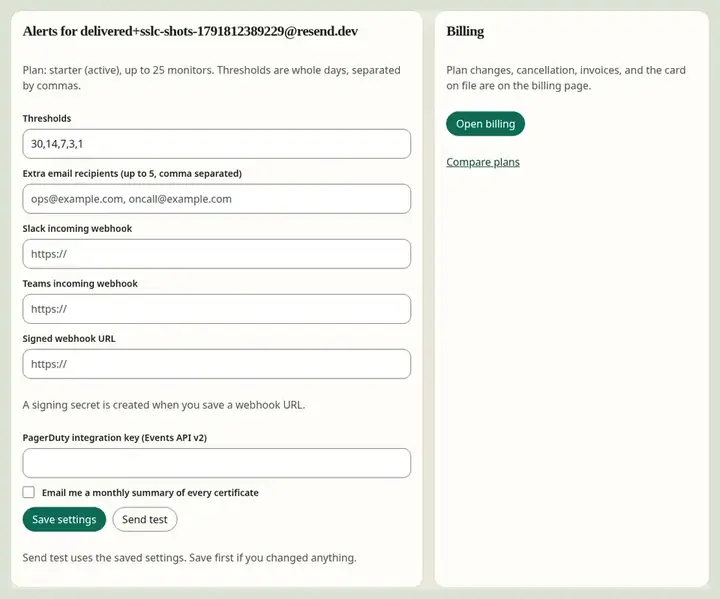
- In SSL Clock, open Settings and paste it into Signed webhook URL. Save, and a signing secret starting with
whsec_appears. - Store the secret with your endpoint's other credentials.
- Click Send test. The result lists each channel and whether delivery worked.
What we send
Each alert is one POST with Content-Type: application/json, an X-SSLClock-Event header naming the event, and an X-SSLClock-Signature header.
{
  "event": "certificate.expiring",
  "id": "threshold:14:...",
  "sent_at": "2026-10-12T09:00:00.000Z",
  "monitor": { "id": "...", "hostname": "api.example.com", "port": 443, "url": "https://www.sslclock.com/app/monitors/..." },
  "subject": "SSL Clock: api.example.com expires in 14 days",
  "text": "...",
  "data": { "code": "days_14", "threshold": 14, "days_remaining": 14, "valid_to": "...", "issuer": "..." }
}
Events
certificate.expiring: a reminder at one of your thresholds, 30, 14, 7, 3 and 1 day by default.certificate.error: expired, hostname mismatch, broken chain or unreachable, sent on the check that finds it.certificate.changed: the server started serving a different certificate.domain.expiring: the registration is 30, 14, 7 or 1 day from expiry. See domain expiry monitoring.ct.new_certificate: a new certificate for the hostname was logged. See Certificate Transparency monitoring.test: sent when you press Send test.
The id field is stable for a given alert, so you can use it to ignore a repeat delivery.
Verify every request
The signature header looks like t=1760259600,v1=5f2c.... v1 is the hex HMAC-SHA256 of the timestamp, a dot and the raw request body, keyed with your signing secret. Compute it on the raw bytes before any JSON parsing, compare in constant time, and reject requests more than five minutes old.
import crypto from "node:crypto";

function verify(rawBody, header, secret) {
  const parts = Object.fromEntries(header.split(",").map((p) => p.split("=")));
  const age = Math.abs(Date.now() / 1000 - Number(parts.t));
  if (age > 300) return false;
  const expected = crypto.createHmac("sha256", secret).update(parts.t + "." + rawBody).digest("hex");
  return crypto.timingSafeEqual(Buffer.from(expected), Buffer.from(parts.v1 ?? ""));
}
Handle deliveries well
Answer fast, work later
Return a 2xx as soon as the signature checks out, then do the slow work, such as opening a ticket, in a background job. Anything slower than 8 seconds counts as a failure.
Expect the occasional repeat
Store the id of each event you handle. If the same one arrives again, acknowledge it and skip the work.
Branch on the event
Read the X-SSLClock-Event header or the event field and send each type where it belongs. Unknown types are worth logging rather than rejecting, so a new event never breaks your endpoint.
Example uses
- Open a ticket in your tracker for
certificate.expiringat 14 days, assigned to the team that owns the hostname. - Page through your own tooling on
certificate.error, or use the built-in PagerDuty integration instead. - Feed your SIEM with
ct.new_certificateso the security team sees new issuance next to everything else. - Update an internal status board from the event stream, and fill in the gaps with the REST API.
Delivery rules
The URL must use HTTPS, must not carry a username or password, and must resolve to a public address. Requests time out after 8 seconds and redirects are not followed, so a misconfigured endpoint fails in Send test, where you can see it. A failed delivery is retried before it is reported as failed.
Prefer a chat channel? See Slack alerts and Microsoft Teams alerts.
Related guides
- All alert integrations
- PagerDuty for the same alert
- The CT event a webhook can carry
- Email, Slack, and SMS next to webhooks
Guides by team type
Pick the page that matches how you run certificates today:
Check a site with the free SSL checker or see pricing. Read the 47-day certificate timeline and Let's Encrypt expiry emails. The set is on free SSL tools. Every guide is indexed on SSL certificate guides. Comparisons are indexed on SSL monitoring comparisons.
FAQ
Are webhooks included on the Free plan?
Yes. Signed webhooks are on every plan, including Free.
Which events are sent?
certificate.expiring, certificate.error, certificate.changed, domain.expiring, ct.new_certificate, and test when you press Send test.
How do I know a request came from SSL Clock?
Every POST carries X-SSLClock-Signature with a timestamp and an HMAC-SHA256 of the timestamp and raw body, made with your signing secret. Check it, and reject anything older than five minutes.
Can I rotate the signing secret?
Yes. Tick Rotate on save in Settings and a new secret is created. Update your endpoint at the same time.
What counts as a successful delivery?
Any 2xx response within 8 seconds. Redirects are not followed, so point the URL at the final address.
Can the URL be on my internal network?
No. The URL must use HTTPS and resolve to a public address. Use a public endpoint or a gateway that forwards inside.