What SSL Clock checks on every certificate
We read the live public certificate. You get five reminder days plus breakage alerts that name the cause and the fix.
Expiry reminders on your schedule
30, 14, 7, 3 and 1 day out by default. Add 60 days for more notice, or cut it to two reminders for fewer emails. Set up to 10 reminder days, each sent once per certificate.
Breakage alerts
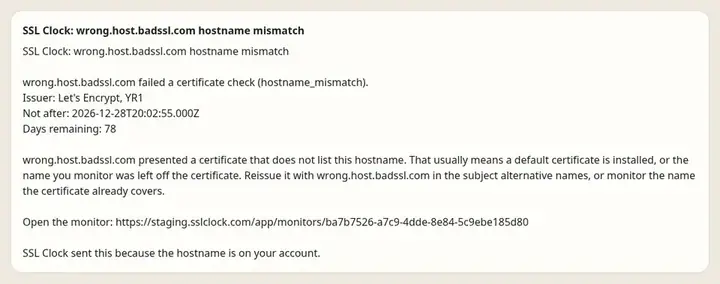
Expired. Hostname mismatch after a migration. Broken chain after a server rebuild. A TLS handshake that fails. A host that stops answering for 3 checks in a row. You get an alert from the check that finds it.
Why it failed, in plain English
"Your certificate covers www.example.com but not example.com. Add the bare domain to your next renewal." Every alert explains the cause and the fix.
What a check looks like
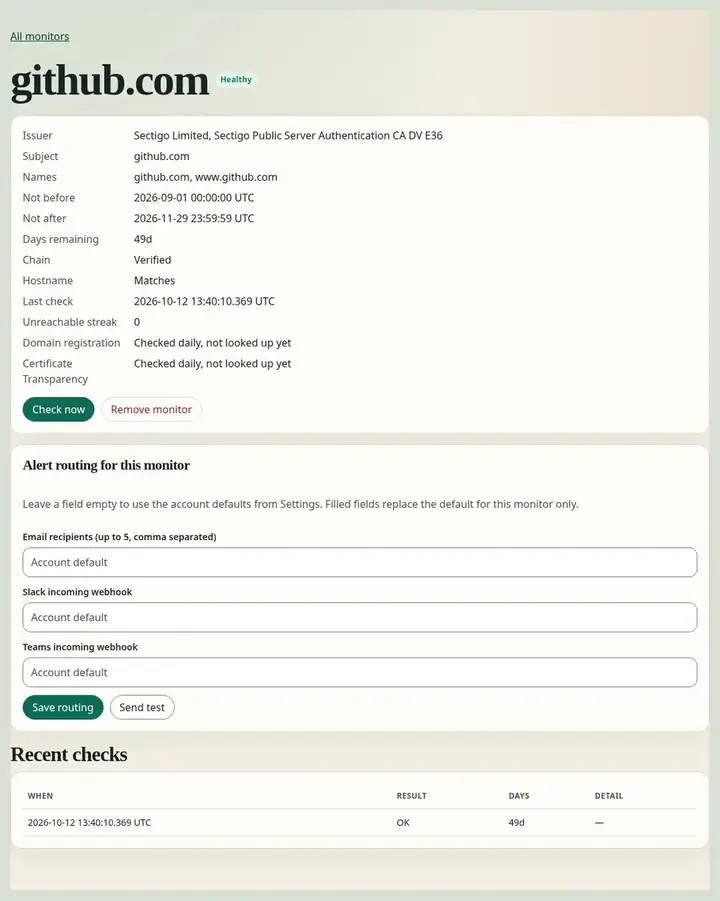
Every check opens a fresh TLS connection to the hostname and port, reads the certificate the server sends and records the result. The monitor page shows the issuer, every name on the certificate, chain and hostname status and the full history.
Check frequency
| What | Free and Starter | Pro and Business |
|---|---|---|
| Certificate checks | Every 6 hours | Every hour |
| Domain registration (RDAP) | Daily | Daily |
| Certificate Transparency logs | Daily | Daily |
| On demand | Any time, from the dashboard or API | Any time, from the dashboard or API |
Status pages and reports
Publish an optional public status page showing each hostname's certificate status and expiry date, useful for clients and colleagues. It is not indexed by search engines. Opt in to a monthly summary email, and export every monitor to CSV whenever you need a record.
Compared with uptime-only tools
An uptime check asks if the page loads. It stays green right up to the day the certificate expires, then everything fails at once. SSL Clock reads the certificate itself, so you hear about the problem weeks before, and about chain or name mistakes that some clients reject while browsers paper over them. Check one now with the free SSL checker.
Who each guide is for
Read the guide that matches the team: SSL monitoring for agencies, SSL monitoring for MSPs, SSL monitoring for SaaS, and SSL monitoring for online stores.
Alerts that reach a human
Email to you and up to 5 more people, Slack or Microsoft Teams for the team. Send each site's alerts where they'll get read, with its own email list, Slack or Teams channel. A Send test button proves every channel works.
Know when a certificate changes
When a site starts serving a different certificate, you get a note with the old and new issuer and expiry. Expected after a renewal, worth a look when nobody renewed.
Domain expiry and Certificate Transparency
Once a day we look up each domain's registration expiry over RDAP and warn at 30, 14, 7 and 1 day. We also watch public Certificate Transparency logs through crt.sh and tell you when a new certificate is issued for your hostname. Read more about domain expiry monitoring and Certificate Transparency monitoring.
Webhooks, PagerDuty and an API
All four integration pages: the integrations hub, signed webhooks, PagerDuty, and Microsoft Teams. Slack is on the Slack page.
Signed webhooks
Alerts POST to your endpoint as JSON, signed with HMAC-SHA256 so you can prove they came from us. See webhook alerts.
PagerDuty
Paste an Events API v2 integration key and problems page your on-call rota with the right severity. See PagerDuty alerts.
REST API
Add, list, check and remove monitors from scripts and CI with the REST API. Keys are shown once and stored hashed.
Bring your team
Invite admins and view-only members by email: 3 seats on Starter, 10 on Pro and 25 on Business. Bulk import hostnames from a paste or CSV, export the list as CSV, publish a public status page, and opt in to a monthly summary email.
Nothing to install
We check from the public internet. No agents, no firewall changes, no private keys.
Free checker for quick looks
Check any domain in seconds with the free SSL checker before you even sign up. Look up the issuer and names when the question is who signed the file. An agency audit lists the public client hostnames. An expired certificate stops checkout before the cart HTML is sent. Plans start at $0. See pricing. The longer notes are on SSL certificate guides.
Comparisons
- SSL comparisons
- Pricing comparison
- TrackSSL alternative
- KeyChest alternative
- UptimeRobot alternative
- Red Sift Certificates Lite alternative
- Oh Dear alternative
- Cert Spotter alternative
- StatusCake alternative
- Site24x7 alternative
- Hyperping alternative
- Best SSL monitoring tools 2026
Guides by team type
Pick the page that matches how you run certificates today:
Check a site with the free SSL checker or see pricing. Read the 47-day certificate timeline and Let's Encrypt expiry emails. The set is on free SSL tools. Every guide is indexed on SSL certificate guides. Comparisons are indexed on SSL monitoring comparisons.
FAQ
How often do you check?
Every 6 hours on Free and Starter, and every hour on Pro and Business, around the clock. Domain registration and Certificate Transparency are checked daily.
Can you monitor internal certificates?
SSL Clock watches every certificate the public internet sees: your sites, APIs, mail servers and anything on a custom port. We do not watch private-only certificates.
Are all features on every plan?
Every plan, including Free, gets email, Slack, Teams, webhook and PagerDuty alerts, the REST API, status pages and bulk import. Paid plans add monitors and seats. Pro and Business add hourly checks.
How is this different from uptime monitoring?
Uptime monitors ask whether a page loads. We read the certificate itself: expiry, chain, names and issuer, plus domain registration and CT logs. A site can be up while its certificate is days from expiring.
Can I run a check right now?
Yes. Every monitor has a Check button, and the API has an endpoint that runs a check and returns the result.
How do signed webhooks work?
Each POST carries an X-SSLClock-Signature header with a timestamp and an HMAC-SHA256 of the timestamp and body, using your signing secret. Reject anything older than five minutes.
Can I export my data?
Yes. Download every monitor as CSV from the dashboard at any time.
Do alerts repeat?
Each reminder day is sent once per certificate. Problem alerts are sent when the problem appears, and a renewed certificate starts a fresh set of reminders.