Red Sift Certificates Lite alternative
Lite is email and a week's notice. SSL Clock warns at 30, 14, 7, 3 and 1 day, and posts to Slack, Teams and PagerDuty on Free.
How the two compare
| Feature | SSL Clock | Red Sift Certificates Lite |
|---|---|---|
| Price | $0 a month for 3, then $9 a month for 25, $29 a month for 150, $69 a month for 500 | Free for up to 250 certificates |
| Finding certificates | You add hostnames by paste, CSV or API | Discovers certificates for your domains and subdomains |
| How hosts are checked | Live TLS check every 6 hours, hourly on Pro and Business | Daily scans over HTTPS on port 443 |
| Custom ports | Any host:port, for mail, APIs and admin panels | Port 443 described |
| Expiry warnings | 30, 14, 7, 3 and 1 day by default, adjustable to any 1 to 10 days | Its FAQ describes 7-day alerts |
| Alert channels | Email plus 5 recipients, Slack, Teams, signed webhooks, PagerDuty | |
| Fix steps in each alert | Yes | Not listed |
| Hostname and chain problems | Mismatch, invalid chain and TLS errors alerted as soon as a check finds them | Not listed for Lite |
| Domain registration expiry | Daily RDAP lookups | Not listed |
| Certificate Transparency | Daily CT watch for each hostname | Listed for the paid Red Sift Certificates product |
| Team seats | 3 Starter, 10 Pro, 25 Business | Not listed |
| REST API | Every plan | Not listed |
Red Sift details come from the Certificates Lite product page on redsift.com, checked 18 Oct 2026. "Not listed" means we could not find it there.
A week's notice is tight
Seven days is fine when renewal is a button press. It is tight when the renewal needs a purchase order, a change window, a DNS change through another team or a certificate on an appliance someone has to log in to. SSL Clock warns at 30, 14, 7, 3 and 1 day by default, and you can set up to 10 reminder days of your own, such as 60 and 45 for certificates bought by hand.
When an automated renewal fails, the 30-day warning is the useful one. Most ACME clients renew with about 30 days left, so a certificate still showing 25 days a week after that tells you the job broke, with weeks to fix it.
Alerts where your team already looks
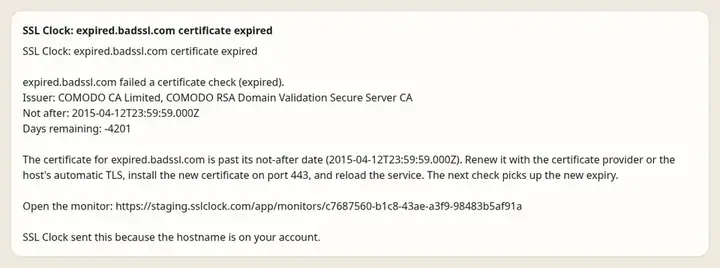
An email to one inbox is easy to miss on holiday. SSL Clock sends to you and up to 5 more addresses, and to Slack, Microsoft Teams, a signed webhook or PagerDuty. Each hostname can go to its own place, so client sites reach the account manager and the payment API pages on-call. Every alert says what went wrong and how to fix it.
Checks beyond the expiry date
Expiry is only one way a certificate breaks a site. After a migration the server can present a certificate for a different name. After a rebuild the intermediate goes missing and phones fail while desktop browsers still work. SSL Clock flags hostname mismatches, invalid chains and TLS errors from the check that finds them, and tells you when a site starts serving a different certificate, with the old and new issuer and expiry.
From inventory to alerts
Open your Certificates Lite inventory and pick the hostnames that would hurt most if they lapsed. Add them to SSL Clock one per line or as a CSV, using host:port for anything not on 443. Free is $0 a month for 3. Starter is $9 a month for 25.
Custom ports and mail hosts
Lite's public page describes daily scans over HTTPS on port 443. SSL Clock accepts any host:port. Add mail.example.com:993, api.example.com:8443 or an admin panel on 4443 the same way you add a website. Each one gets the same five reminder days, breakage alerts and fix steps.
Agencies and MSPs use this for client mail and remote access as well as the public site. One account, one import, one Slack or Teams channel per client if you want it that way.
What a 30-day reminder buys you
Most ACME clients try to renew with about 30 days left. If the 30-day alert arrives and the date has not moved, the job already failed. You still have two weeks before the 14-day ping, and a change window before the 7-day one. A 7-day-only email leaves you buying a certificate on a Friday night.
SSL Clock sends 30, 14, 7, 3 and 1 by default. You can add 60 and 45 for paid certificates that need a purchase order. Each reminder day is sent once per certificate.
We can load your Red Sift inventory for you
Send the hostnames from your Certificates Lite inventory as a file or a screenshot. We add the ones you want watched and confirm once the first checks have run.
Switch to a paid plan and your first 3 months are free. Or keep Free for 3 certificates, no card needed.
Compare our plans, or see where Lite sits among nine tools in the 2026 roundup.
Guides by team type
Pick the page that matches how you run certificates today:
Check a site with the free SSL checker or see pricing. Read the 47-day certificate timeline and Let's Encrypt expiry emails. The set is on free SSL tools. Every guide is indexed on SSL certificate guides. Comparisons are indexed on SSL monitoring comparisons.
FAQ
When were the Red Sift details checked?
On 18 Oct 2026, from Red Sift's Certificates Lite product page.
What is on SSL Clock Free?
$0 a month for 3 sites with Slack, Teams, webhooks and PagerDuty. No card. No time limit.
Why would I pay for SSL Clock then?
For earlier and adjustable reminders, alerts in Slack, Teams, webhooks and PagerDuty, fix steps in every alert, custom ports, hourly checks on Pro and Business, domain expiry and team seats.
How do I add certificates?
Paste hostnames, upload a CSV or use the API. Each monitor is a hostname you name.
How do I move hostnames from Lite?
Export or copy the inventory, then paste the ones that matter into SSL Clock's bulk import.
Do you check ports other than 443?
Yes. Add any host:port, such as mail.example.com:993 or api.example.com:8443. Red Sift describes its daily scans as running over HTTPS on port 443.