Page on-call for outages, and keep reminders for working hours
Every alert reaches PagerDuty with a severity that fits, so renewals stay planned work and real breakage gets answered fast.
Page the right person at the right time
A certificate reminder 30 days out should never wake anyone. A production API serving an expired certificate at 3 a.m. should. SSL Clock sends every alert to PagerDuty with a severity that matches how urgent it is, so your existing rules decide who gets paged and when. Renewals become planned work, and the rare real outage reaches on-call in minutes.
Connect PagerDuty
- In PagerDuty, open the service that should own certificate alerts, for example Web platform.
- Add an Events API v2 integration and copy the integration key.
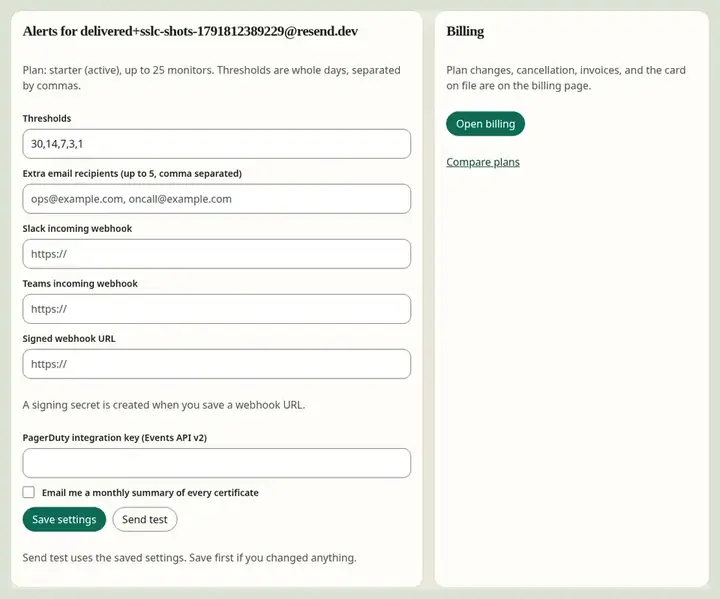
- In SSL Clock, open Settings, paste it into PagerDuty integration key and save.
- Click Send test. A test event with severity info arrives on the service.
What arrives in PagerDuty
Each alert becomes a trigger event with fields your responders can use straight away:
- Summary: the alert subject, such as SSL Clock: api.example.com expires in 3 days.
- Source: the hostname and port, for example
api.example.com:443. - Component and class:
tls-certificateand the event type, such ascertificate.error. - Custom details: days left, expiry date, issuer and the plain-English cause and fix.
- Link: Open in SSL Clock, straight to the monitor.
Repeat alerts for the same problem share a dedup key, so they fold into one incident instead of opening a new one each time.
Severity that makes sense
Reminders
Certificate reminders are warning until 3 days out, then critical. Domain registration reminders are warning at 30 and 14 days and critical at 7 and 1 day.
Problems
Expired certificates, hostname mismatches, broken chains and unreachable hosts are sent as error on the check that finds them. Pro and Business plans check every hour, Free and Starter every 6 hours.
Heads-ups
A changed certificate and a new Certificate Transparency entry are sent as info. Most teams route those to low urgency.
Suggested PagerDuty rules
PagerDuty decides urgency, and SSL Clock gives it what it needs to decide well. A setup many teams start with:
High urgency
Events with severity critical or error. That covers a certificate 3 days or less from expiry, a domain 7 days or less from expiry, and anything already broken. These are worth waking someone for, because a customer is about to see a warning page or already is.
Low urgency
Events with severity warning. A certificate 7 to 30 days out is a job for working hours, so it waits in the queue until the morning and gets picked up with the rest of the day's work.
Suppress or log
Events with severity info, such as a changed certificate or a new log entry. Some teams keep these as a record without notifying anyone. Others send them to a security service instead.
Because every event carries the hostname as its source, you can also route by name. Payments hostnames can go to the payments team, marketing sites to the web team, all from one SSL Clock account.
Before you connect
- Pick one service that owns certificate health. A shared platform or infrastructure service works well.
- Trim reminder days in Settings if you only want PagerDuty to hear about the last few, and keep email or Slack for the early ones.
- Close incidents by hand once the fix is out. The monitor page shows the new expiry date as soon as the next check runs.
- Send a test after any change to the key, so you know events still arrive.
A worked example
Your API's certificate renews through cert-manager. A DNS provider token expired last month, so the renewal has been failing. At 7 days out SSL Clock sends a warning to PagerDuty, which your rules turn into a low-urgency incident for the platform team. Someone picks it up the next morning, replaces the token and the next check shows a new expiry date. No one was paged at night, and no customer saw an error.
Read more about SSL monitoring for SaaS teams.
Works alongside your other channels
PagerDuty is one channel among several. The same alert can also go to email, a Slack channel or a signed webhook, so the on-call engineer gets paged and the wider team sees the context. Everything is included on every plan, and you can compare plans on the pricing page.
Related guides
- All alert integrations
- Signed webhooks when you do not use PagerDuty
- An expired API hostname that should page on-call
- Reminders that should stay in email
Guides by team type
Pick the page that matches how you run certificates today:
Check a site with the free SSL checker or see pricing. Read the 47-day certificate timeline and Let's Encrypt expiry emails. The set is on free SSL tools. Every guide is indexed on SSL certificate guides. Comparisons are indexed on SSL monitoring comparisons.
FAQ
Is PagerDuty included on the Free plan?
Yes. The PagerDuty integration is on every SSL Clock plan, including Free.
Which PagerDuty key do I need?
An Events API v2 integration key from a service in PagerDuty. It is 32 letters and numbers.
Will a repeat alert open a second incident?
No. Each alert uses a dedup key made from the monitor and the alert, so PagerDuty groups repeats into the same incident.
Does SSL Clock resolve the incident when the certificate is fixed?
SSL Clock sends trigger events. Resolve the incident in PagerDuty once the next check shows the host as healthy.
Will informational alerts page someone?
They are sent with severity info. Use PagerDuty's event rules to route info events to low urgency or suppress them.
Can I send different sites to different PagerDuty services?
The PagerDuty key is account-wide. Use PagerDuty's event rules on the source field to route by hostname.