SSL expiry checker
Free SSL expiry checker: expiry date and days left
The SSL expiry time is the not-after date in UTC. Results show that date, the days left, and the issuer. No signup for the check.
SSL expiry time
The SSL expiry time is the not-after date on the certificate the host serves, in UTC. Whole days left are counted from the moment you run the check to that date. A time near midnight UTC can be a different calendar day in your time zone.
Start free monitoring for 3 sites after you see the days left. Compare the Oh Dear alternative for SSL only monitoring.
Three longer notes sit next to the checkers. Certificate transparency search shows how to read a log entry and compare it with the handshake. SSL certificate discovery is how a name gets onto the list in the first place. SSL monitoring versus uptime monitoring separates a failed handshake from a failed homepage.
Teams buying for more than one site usually start from a roster. Agencies, MSPs, and online stores each have a note on what to import. An agency audit is the checklist before the import. An expired certificate stops checkout before the cart HTML is sent. An existing export goes through the switch page.
What the days-left number uses
Days left counts whole days from the moment you ran the check to the certificate's not-after date. That date is shown in UTC under Expires. At 30 days or fewer the status changes to Expires soon, and a negative count means visitors already see a browser warning.
The Expires field is not-after in UTC. A time near midnight UTC can be a different calendar day in your time zone, so convert before you plan a maintenance window.
Need the chain, hostname coverage and fixes for errors as well? Run the full SSL certificate checker.
Check SSL expiry on any port
| Feature | Website | API or admin panel | IMAP over TLS | SMTP submission over TLS | SMTP with STARTTLS |
|---|---|---|---|---|---|
| Enter | example.com | api.example.com:8443 | mail.example.com:993 | mail.example.com:465 | Use OpenSSL below |
| Notes | Port 443 by default. Check www and the bare domain separately. | Often a separate certificate on a separate server. | Mail clients fail quietly when this one expires. | Implicit TLS, so the checker can read it directly. | Ports 25 and 587 upgrade to TLS after connecting. |
Check many hosts or fail CI early
Paste hosts into the loop. Anything without a port uses 443.
for h in example.com www.example.com api.example.com:8443 mail.example.com:993; do
  host="${h%%:*}"; port="${h#*:}"; [ "$port" = "$h" ] && port=443
  printf '%s ' "$h"
  openssl s_client -connect "$host:$port" -servername "$host" </dev/null 2>/dev/null | openssl x509 -noout -enddate
done
For SMTP with STARTTLS:
openssl s_client -connect mail.example.com:587 -starttls smtp -servername mail.example.com </dev/null 2>/dev/null | openssl x509 -noout -enddateTo fail a pipeline with three weeks to spare, use checkend:
#!/bin/sh
# Exit 1 if the certificate on $1 expires within 21 days (1814400 seconds).
host="$1"; port="${2:-443}"
openssl s_client -connect "$host:$port" -servername "$host" </dev/null 2>/dev/null \
  | openssl x509 -noout -checkend 1814400 >/dev/null \
  || { echo "$host:$port expires within 21 days"; exit 1; }
How certificate lifetimes are changing
| Issued on or after | Maximum validity | Renewals a year, roughly |
|---|---|---|
| 15 March 2026 | 200 days | 2 |
| 15 March 2027 | 100 days | 4 |
| 15 March 2029 | 47 days | 8 |
Shorter lifetimes mean the date you looked up today goes stale sooner. See the 47-day certificate timeline (CA/B Forum ballot SC-081v3).
Look up an expiry date yourself
From the address bar
Open the padlock or site information icon, then the certificate viewer. Depending on the browser the date is labelled Expires on, Valid to, Not After or Expires.
With OpenSSL
openssl s_client -connect example.com:443 -servername example.com </dev/null 2>/dev/null | openssl x509 -noout -enddateFor both ends of the validity window:
openssl s_client -connect example.com:443 -servername example.com </dev/null 2>/dev/null | openssl x509 -noout -startdate -enddateThe answer includes notBefore= and notAfter= in GMT, which is UTC here.
With curl
curl -sv https://example.com -o /dev/null 2>&1 | grep -E 'start date|expire date'curl prints the certificate's start and expire dates as it connects, so this works anywhere curl is installed.
Why auto-renewal still fails
Automatic renewal is the right default, and it still breaks. These are the failures we see most:
- DNS changed. A move to a new DNS host breaks DNS-01 validation, or a record now points away from the server answering HTTP-01.
- The job stopped. A cron entry or systemd timer was lost in a server rebuild, or the container that ran it is gone.
- Credentials expired. The API token used to create DNS records was revoked or rotated.
- Renewed but not reloaded. The new file is on disk while the web server still serves the old one from memory.
- Rate limits. Repeated failed attempts hit the CA's limits and the next try is refused.
Watching the date from outside catches all of these, because the date only moves when a new certificate is actually being served. Read why Let's Encrypt stopped sending expiry emails.
Recommended reminder schedule
| Days left | What to do |
|---|---|
| 30 | Confirm the renewal job is healthy. Most ACME clients renew around now. |
| 14 | If the date has not moved, renewal has failed. Investigate this week. |
| 7 | Fix it today. Renew by hand if you need to. |
| 3 and 1 | Escalate. Expiry is days away. |
SSL Clock uses exactly this schedule by default, and you can change it to any 1 to 10 reminder days.
Stop checking by hand
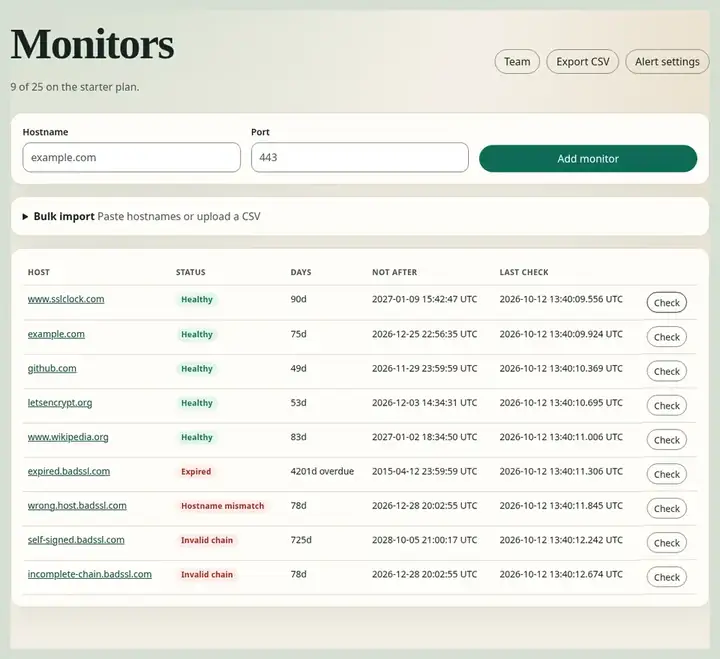
A date you looked up once goes stale. Add your domains to SSL Clock and we check them around the clock, every 6 hours on Free and Starter and every hour on Pro and Business, then remind you by email, Slack or Teams. Bulk import takes a pasted list or a CSV. See the full feature list or plans.
Guides by team type
Pick the page that matches how you run certificates today:
Check a site with the free SSL checker or see pricing. Read the 47-day certificate timeline and Let's Encrypt expiry emails. The set is on free SSL tools. Every guide is indexed on SSL certificate guides. Comparisons are indexed on SSL monitoring comparisons.
FAQ
Is this check free?
Yes. See the expiry date, issuer and chain status straight away, with no signup.
Can I get reminders after I check?
Yes. Create a free account, add the domain and we remind you at 30, 14, 7, 3 and 1 day before it expires.
What does Expires soon mean?
The certificate has 30 days or less left. That is when we suggest you check that renewal is on track.
My certificate auto-renews. Why did it nearly expire?
Automatic renewal can fail without warning when DNS changes, a firewall blocks the validation request, an API token expires or the renewal job stops running. The expiry date shows the result, whatever went wrong.
How do I check expiry for many domains at once?
The free expiry checker accepts up to 10 hosts, one per line, with no account. That check does not save them. Paste the same list into bulk import after signup, or upload a CSV, and every hostname gets its own countdown. Free covers 3 hosts. Slack is on Free.
Which time zone is the expiry date in?
Dates are shown in UTC, which is how certificates store them.
Does it work for any issuer?
Yes. Let's Encrypt, ZeroSSL, Google Trust Services, DigiCert, Sectigo or any other public CA. We read the certificate your server actually serves.
How early should I renew?
Most ACME clients renew when about a third of the lifetime is left. For a 90-day certificate that is around day 60. A 30-day reminder gives you room to fix a failed renewal.
Can I check a certificate on a port other than 443?
Yes. Enter host:port, for example api.example.com:8443 or mail.example.com:993. The checker connects with TLS on that port.
Does it work for SMTP on port 587 or 25?
Not in the form. Those ports use STARTTLS. Use the OpenSSL example above with -starttls smtp, or check implicit TLS on port 465 instead.
How do I fail a CI build when a certificate is close to expiry?
Use openssl x509 -checkend with seconds as a buffer. It exits with status 1 when the certificate expires within that window. The sample script uses 21 days.
Why does the expiry date differ from what my CA dashboard shows?
Your CA shows the certificate it issued. We show the certificate the server is actually serving. If they differ, the new file is not installed or the server was not reloaded.