Served certificate vs CT log vs chain
The served certificate is what visitors see. CT logs show what was issued. The chain decides whether clients trust it.
Three different signals
The served certificate is what visitors get today. Certificate Transparency logs show what CAs issued, including certs not yet installed. The chain is whether intermediates trace to a trusted root.
Buyers comparing tools from the Oct 2026 Hyperping and MonitoringDaddy roundups should ask which of the three a product actually watches. SSL Clock watches all three on every plan, including Free.
| Signal | SSL Clock | Typical uptime SSL add-on | CT-only tool |
|---|---|---|---|
| Served cert expiry | Yes, every check | Often yes | No |
| Chain and hostname errors | Yes, with fix text | Sometimes shallow | No |
| Certificate Transparency | Daily on crt.sh | Often not listed | Yes, core job |
| Domain registration expiry | Daily RDAP | Sometimes | No |
Roundup notes: Hyperping blog (1 Oct 2026) lists no CT on Hyperping SSL checks. MonitoringDaddy roundup (2026) states no chain validation or CT. Checked 25 Oct 2026.
When each alert saves you
- Served cert reminders catch failed renewals and wrong files still loaded on the server.
- Chain alerts catch missing intermediates before mobile clients fail.
- CT alerts catch certificates issued for your name that nobody on your team ordered.
Read how CT fits daily checks on the Certificate Transparency monitoring page, or run the free SSL checker on any hostname right now.
Set up all three
- Add hostnames on Free (3 sites, no card).
- Route alerts to email, Slack or Teams.
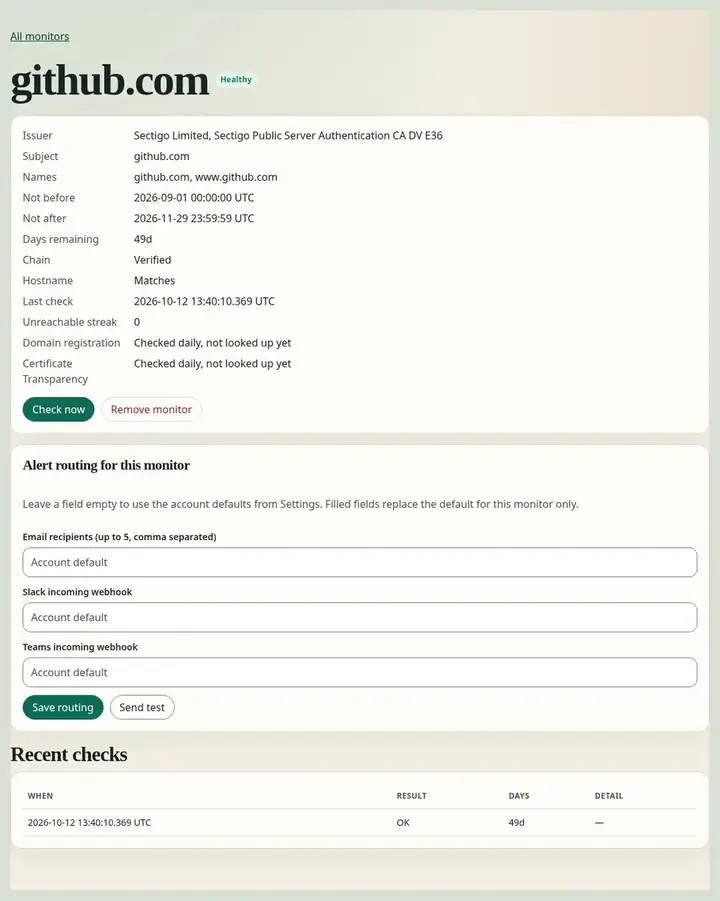
- Use the monitor page to compare served cert dates with the latest CT entry.
Plans and limits are on pricing. Compare vendors in the 2026 tools roundup.
Worked examples
Renewal succeeded but visitors still see the old cert
CT logs show a fresh Let's Encrypt certificate. The served certificate check still reports 12 days left on the previous file. That is a deploy or reload problem, not a CA problem. Fix the load balancer or CDN config, then re-run the SSL checker.
Expiry looks fine but mobile clients fail
The served certificate is valid for 60 days, yet chain shows Not verified. Install the missing intermediate the CA emailed you, or enable the full chain file your platform expects.
A cert appears in CT you did not request
Someone with DNS access ordered a certificate for a hostname you forgot was still pointed at an old host. CT catches it within a day even when nothing is served yet.
How often we check each signal
| Signal | Free and Starter | Pro and Business |
|---|---|---|
| Served certificate and chain | Every 6 hours | Every hour |
| Certificate Transparency | Daily | Daily |
| Domain registration (RDAP) | Daily | Daily |
On demand checks from the dashboard or API run immediately on every plan.
Read the three signals side by side
The served certificate, the Certificate Transparency log, and the chain answer different questions. When they disagree, the repair is different too. Use the columns below on one hostname before you decide whether to reload a server, call a certificate authority, or install a missing intermediate.
| Question | Served certificate | CT log | Chain |
|---|---|---|---|
| What it observes | The certificate presented on the public TLS connection | Certificates a CA logged for the name, via crt.sh | Leaf plus intermediates toward a trusted root |
| A calm reading | Dates still ahead, and your name is on the certificate | The newest entry matches a renewal you expected | Verified |
| A reading that needs a person | Dates are short, or the name is missing | An issuer or a certificate nobody ordered | Not verified |
| What it cannot prove | That a CA issued a file you have not installed | That any server is presenting the logged certificate | That the hostname matches |
Private and internal certificates
Private and internal certificates are not supported. The three signals all depend on a public hostname. Checks open a connection from the public internet and refuse private and internal addresses. A certificate that lives only on a company network, or a name that does not resolve in public DNS, is out of scope. There is no agent and there is nowhere to upload a private key. A public hostname can still present a certificate that visitors do not trust. The chain column is the one that shows that failure. The served certificate is still the file those visitors receive, even when the dates look fine.
A renewal that only half finished
Certificate Transparency can list a fresh certificate while the served certificate is still the previous file. That split means the CA issued a replacement and the server, load balancer, or CDN is still presenting the old one. Reload or redeploy, then run the free SSL checker on the same hostname. The checker reads the live certificate. The form asks for a hostname and does not ask for an email address. Domain registration is a separate daily RDAP lookup. It is not one of these three columns. A lapsed domain takes the name down even when the certificate dates are still in the future.
Three free reads sit next to the live checker. The certificate decoder explains a PEM you already have. The CSR decoder explains a signing request before a certificate authority sees it. The certificate chain checker reads the chain a public hostname sends, including each expiry.
Free and Starter read the served certificate and the chain about every 6 hours. Pro and Business read them about every hour. Certificate Transparency and the domain date are daily on every plan. An on-demand check from the dashboard or the API runs immediately. The monitor page is where the served dates sit next to the latest CT entry, so you do not have to keep the three readings in three products.
Three longer notes sit next to the checkers. Certificate transparency search shows how to read a log entry and compare it with the handshake. SSL certificate discovery is how a name gets onto the list in the first place. SSL monitoring versus uptime monitoring separates a failed handshake from a failed homepage.
Operators who want the product around these checks can read what each check covers, SSL monitoring for SaaS and APIs, and ingress and load balancer certificate expiry. Look up the issuer and the names on one live host. Alerts leave the dashboard through signed webhooks or PagerDuty.
Related guides
- Daily Certificate Transparency checks
- A SAN list that is not the file visitors receive
- Read chain, hostname, and expiry on one public name
- Why the served date moves more often
Guides by team type
Pick the page that matches how you run certificates today:
Check a site with the free SSL checker or see pricing. Read the 47-day certificate timeline and Let's Encrypt expiry emails. The set is on free SSL tools. Every guide is indexed on SSL certificate guides. Comparisons are indexed on SSL monitoring comparisons.
FAQ
What is the served certificate?
The certificate your server presents during a TLS handshake on the hostname and port you monitor. That is what browsers and APIs see.
What is a Certificate Transparency log?
A public log where CAs must record certificates they issue. SSL Clock reads crt.sh daily to spot new entries for your hostnames.
What is the chain?
The leaf certificate plus intermediates up to a trusted root. A missing intermediate breaks some clients even when expiry looks fine.
Which signal catches a failed deploy?
The served certificate. CT can show a renewal succeeded at the CA while the server still serves the old file.
Which signal catches shadow issuance?
Certificate Transparency. A cert can appear in logs before it is installed anywhere you control.
Does SSL Clock check all three?
Yes on every plan. Live TLS for served cert and chain, daily CT through crt.sh, plus domain registration over RDAP.
Do you monitor private or internal certificates?
No. Private and internal certificates are not supported. The served certificate, the chain, and the CT check all depend on a public hostname. Checks refuse private and internal addresses.