Get domain renewal reminders as well as certificate reminders
A lapsed registration takes the site, email and certificates down at once. We watch the date for you.
The renewal that takes everything with it
When a certificate lapses, one site shows a warning. When a domain registration lapses, the website, the email, the API and every certificate renewal on it stop together. It is usually something small: the card on the registrar account expired, auto-renew was off, or the renewal notices went to someone who left. SSL Clock watches the registration date for you and keeps reminding you until the domain is renewed.
Included with every hostname
There is no separate list to keep. Add app.example.com and we work out that the registered domain is example.com, then look up its registration expiry once a day. Ten hostnames on one domain share a single lookup, and two-part suffixes such as .co.uk are handled.
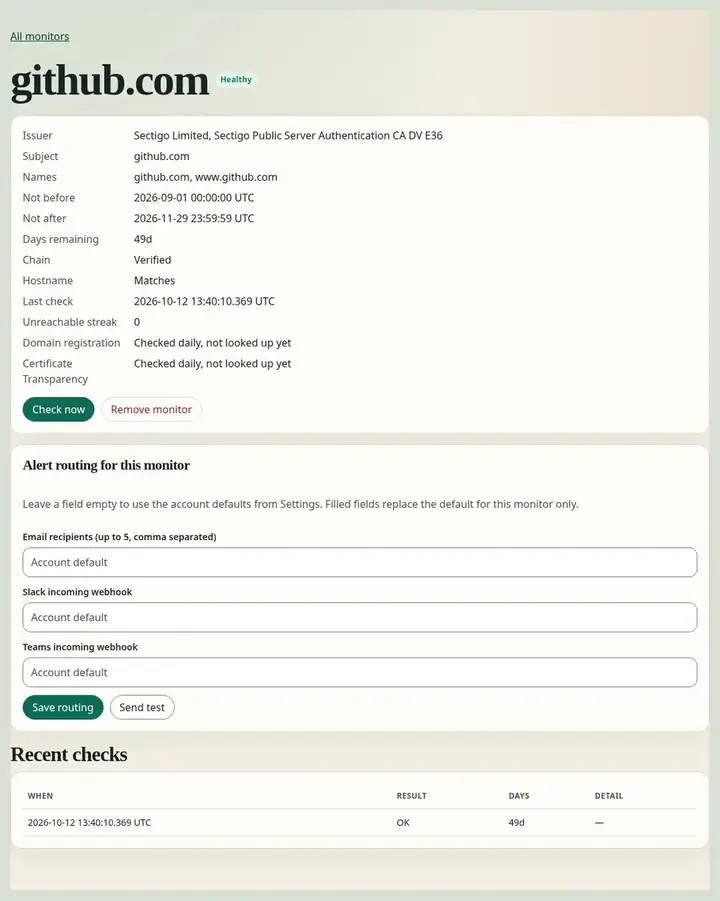
The date sits on each monitor page next to the certificate details, so you see both clocks for a site in one place.
Reminders that keep going
The schedule
You get a reminder at 30, 14, 7 and 1 day before the registration ends. Each one is sent once for that expiry date, so nothing repeats, and after you renew the countdown starts again for the new date.
Where they go
Domain reminders use the same channels as your certificate alerts: email to you and up to 5 more people, Slack, Microsoft Teams, a signed webhook and PagerDuty. The 7 and 1 day reminders are sent as critical, so an on-call rota can treat them that way.
What they say
SSL Clock: domain example.com expires in 14 days

The registration for example.com expires on 2026-10-27, in 14 days.

Renew it with your registrar, or turn on auto-renew and check the card on file. When a domain lapses, the site, email and certificate renewals all stop.
Why RDAP
RDAP is the structured, modern replacement for WHOIS. Registries publish registration data over it in a format machines can read, which means an exact expiry date instead of free text that changes from one registrar to the next. We ask the registry for each domain through the public RDAP bootstrap service.
A few registries, mostly some country-code domains, don't publish an expiry date over RDAP. When that happens the monitor page says so plainly, so you know which domains to keep an eye on at the registrar.
Why domains lapse
- An expired card on the registrar account, so auto-renew fails without anyone noticing.
- Notices sent to an old address, such as a former employee or a freelancer who set the domain up.
- Domains spread over several registrars, each with its own login and its own renewal date.
- Auto-renew switched off during a transfer and never turned back on.
None of these show up on the website until the day it stops working. A reminder from outside the registrar is the simplest safety net.
Who needs this most
- Agencies whose clients own their domains and their registrar logins. A reminder 30 days out gives you time to chase the client. See SSL monitoring for agencies.
- Online stores, where a dark domain stops orders and order emails at the same time. See monitoring for online stores.
- Companies with domain sprawl: campaign domains, old brands, country sites and redirects bought years ago by different people on different cards.
A worked example
A client registered their domain five years ago on a personal card. The card was replaced in the spring. Thirty days before renewal, your Slack channel shows the domain reminder. You email the client, they update the card that afternoon, and the next daily lookup shows the new date a year out. The site never went down.
What the daily lookup does not do
The lookup reads the registration expiry that public RDAP returns for the registrable domain. It does not sign in to a registrar, pay a renewal, or change name servers. If auto-renew fails because a card was replaced, the date stays where it is until someone renews at the registrar. The reminder is the nudge to do that work. After the registry publishes a later date, the next daily read picks it up and the countdown starts over.
Several hostnames on one registered domain share that date. Adding both www and the apex does not create two renewals. A campaign domain, an old brand, or a country site on its own registration is a different date, and it shows up only after you monitor a hostname on it. A redirect that lives on a separate registration is easy to miss because the main site still loads.
When a registry does not publish an expiry, the monitor says so. That is a gap in the public data, not a hidden date we can infer. Keep those names on a registrar checklist. The certificate check beside it still runs, and it still reports the served certificate only. Private and internal certificates are not supported on that check either.
Domain reminders and certificate reminders can fire in the same month and still be different tasks. Renewing the certificate does not extend the registration. Renewing the registration does not install a new certificate. Read the message: one names the registrar date, the other names the certificate date.
Get started
- Create a free account and add the hostnames you care about.
- Choose your alert channels in Settings and send a test.
- Open any monitor the next day to see its domain expiry date.
Domain checks run next to certificate checks and Certificate Transparency monitoring on every plan. Compare plans on the pricing page.
Related guides
- Certificate Transparency beside the RDAP date
- A lapsed registrar card that takes a client roster down
- The certificate date, separate from the registration date
- Certificate lifetimes, which are not the domain term
Guides by team type
Pick the page that matches how you run certificates today:
Check a site with the free SSL checker or see pricing. Read the 47-day certificate timeline and Let's Encrypt expiry emails. The set is on free SSL tools. Every guide is indexed on SSL certificate guides. Comparisons are indexed on SSL monitoring comparisons.
FAQ
Is domain expiry monitoring included on the Free plan?
Yes. Every hostname on every plan gets a daily domain registration check at no extra cost.
Do I need to add the domain separately?
No. Add a hostname such as shop.example.com and we work out the registered domain, example.com, and watch its registration too.
When do the reminders arrive?
At 30, 14, 7 and 1 day before the registration expires. The 7 and 1 day reminders are marked critical for PagerDuty.
Why does my monitor say the registry publishes no expiry date?
Some registries, especially for certain country-code domains, don't share an expiry date over RDAP. We show that on the monitor page so you know to track that one with your registrar.
What is RDAP?
The Registration Data Access Protocol, the structured replacement for WHOIS. Registries publish registration data over it, including the expiry date.
What happens after I renew?
The next daily lookup picks up the new expiry date, and reminders start again well before that one.